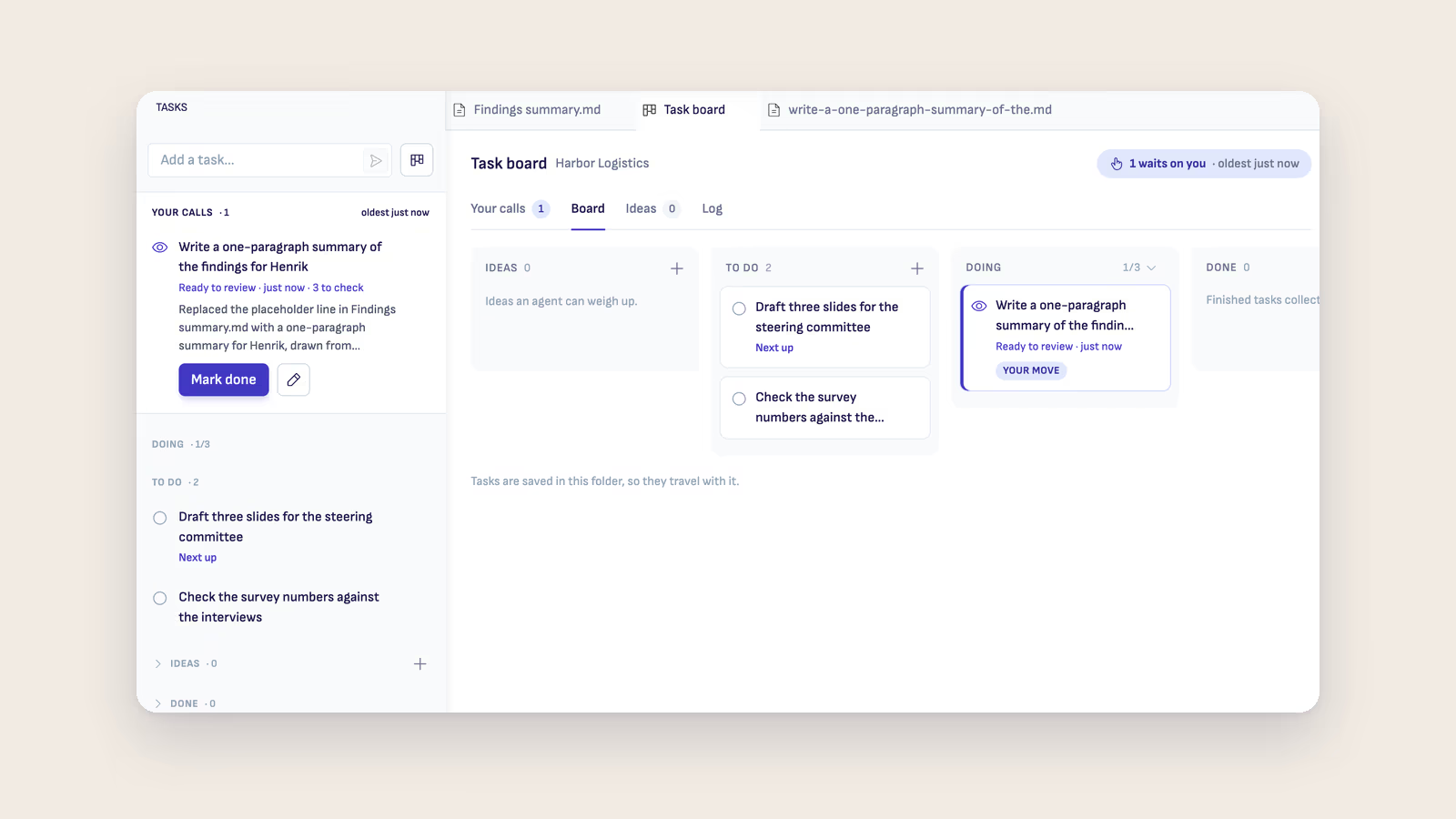
Ritemark v1.14.0 is out. Every project folder now has a task board where you write down what you want done and hand tasks to an AI agent. Dictation and on-device Transcribe now also work on Windows and Intel Macs.
Hand a task to an agent, then review it
Click Tasks in the activity bar, right below the File browser, and the whole board opens with its columns. Task board on the Home tab opens it too. To add a task, type it in Add a task and press Enter.
Press Give to Claude to hand a task over, or use the arrow next to it to pick Codex or OpenCode. The agent works in its own conversation in the AI sidebar while you keep writing. When it finishes, the task shows what it did and what it asks you to check. Then you either Mark done or Ask for changes. Agents never mark a task done and never delete one.
Results to review, questions and approvals come first under Your calls, and the number on the Tasks icon counts them. Doing holds three tasks at a time unless you change that, and Ritemark won't start a second agent on a file another agent is changing. A task that has to wait starts by itself when there is room.
Each task opens as an ordinary Ritemark document. Add a Done when line, because agents finish better when they know what done looks like.
Your tasks are Markdown files in your folder, in .ritemark/tasks/, so the board goes wherever the folder goes. Commit it, sync it, or edit a task in any editor. Agents can use the board too: ask one to "turn these meeting notes into tasks".
In the activity bar, Agent Library now sits below Transcribe and Browser. The task board guide has the details.
Dictation on Windows and Intel Macs
The microphone in the document header now works on Windows PCs and Intel Macs, as it already did on Apple silicon Macs. Your voice is turned into text on your own computer. Nothing is uploaded, and after a one-time download it works offline.
On these computers you speak first and the text comes after. You press Stop, and the text arrives about 20 seconds later on a typical laptop, even after a long dictation. Transcribe's on-device Whisper engine works there too, for MP3, WAV, FLAC, OGG and Record files. On Windows, .m4a and .aac files still need ElevenLabs. Apple silicon Macs on macOS 12 to 14 can now dictate and transcribe on-device as well.
When dictation can't start, it now tells you why and offers the right button. A muted microphone no longer turns into invented words. More in the voice dictation guide.
Browser Recent shows where you've been
The Recent list in the Browser side bar now lists the pages you reach by typing an address or clicking a link, local .html files, and pages an AI agent opens for you. Before, it only showed pages opened from a command.
Newer models for Claude and Codex
Haiku 5.5 is now in the Claude model menu as the quick and light choice. The menu now offers only Claude 5 models, so older ones such as Opus 4.8 and Haiku 4.5 are gone from it. An older model you had already picked keeps working until you choose another. New Codex conversations start on GPT-6.1 Sol, and GPT-5.6 Sol is still in the Codex model menu if you want it.
Updated agents and fixes
The built-in agents are updated: Claude Code 2.1.296, Codex 0.162.1 and OpenCode 1.19.0.
- Browser tools work in every Claude conversation, not only the first one you opened.
- Your first Claude conversation starts on Sonnet 5.5 without a model notice.
- Opening a .wav, .mp3 or .ogg file opens Transcribe without asking which editor should be the default.
- The grey Listening... note is no longer saved into your document while you dictate.
- Handing comments to an agent stays quick, because finished comment tasks older than 30 days are cleared when Ritemark starts.
Download
| Platform | File |
|---|---|
| macOS Apple Silicon | Ritemark-arm64.dmg |
| macOS Intel | Ritemark-x64.dmg |
| Windows x64 | Microsoft Store |
If you already run Ritemark, it offers the update to v1.14.0 itself. The Microsoft Store still serves an earlier version for now. A new Store install starts there, and Ritemark then offers the update to v1.14.0. Full notes are on the GitHub release page.