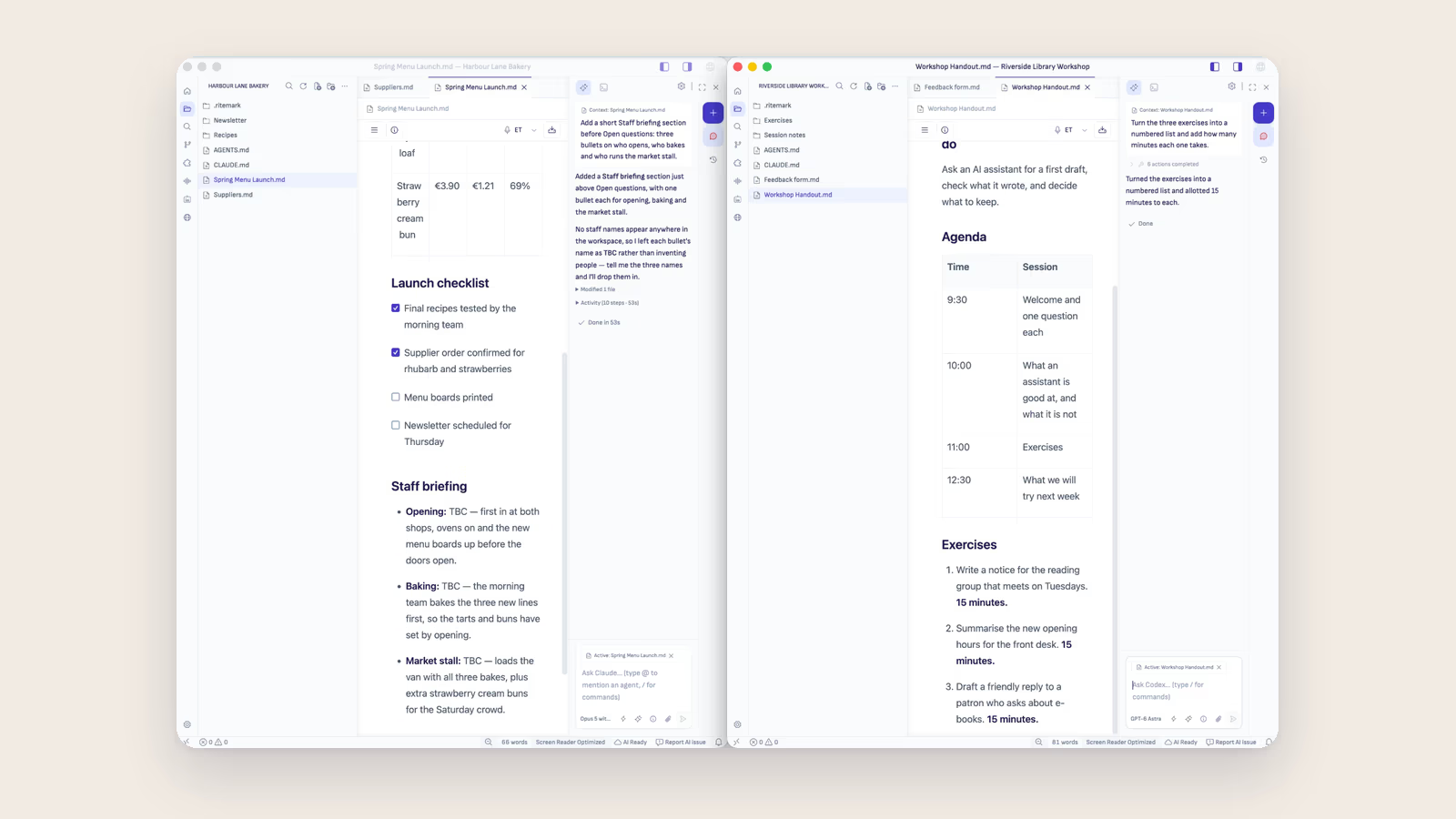
In Ritemark, a window is one folder. Everything in it belongs to that folder: the files in the Folder view, the conversations in the AI sidebar, and the instructions, agents and skills the agents work with. To work on a second project, open it in a new window, and the two stay apart.
Open a Second Project
- Choose File → New Window, or press Shift+Cmd+N (⇧⌘N) on a Mac or Ctrl+Shift+N on Windows.
- In the new window, open the other folder. Pick it from the recent folders on Home, or choose File → Open Folder.
- Look at the title bar. It shows the folder's name next to the open document, so you always know which project you are in.
Arrange the two windows side by side, or keep them on separate screens. Each one works on its own.
Why One Folder per Window
The folder is the project. Everything Ritemark and its agents need for that project lives in it, so opening the folder in its own window brings the whole setup along.
The conversations stay with their project
Ritemark saves agent conversations per project. The Conversations list in the AI sidebar is headed Saved in this project, and it lists only the chats that belong to that folder. A long thread about one client's report does not show up in the window where you write for another client, and you never scroll past it to find your own.
The instructions come from the folder
AGENTS.md and CLAUDE.md at the root of the folder are the project's standing instructions, and Ritemark loads them into every agent session in that window. One client can have "British spelling, formal tone", another "short sentences, in Estonian". You write the rules once, in the folder, and every conversation there starts with them.
Agents and skills belong to the project too
The Agent Library in each window lists, under Project, the agents, skills, commands and flows stored in that folder's .claude/, .agents/ and .ritemark/ folders. Helpers you want everywhere go under User, in your ~/.claude/ folder, and appear in every window. Scheduled agents are set up per folder as well, and each folder asks for your consent before its schedule starts.
Two agents, side by side
Every window has its own AI sidebar and its own choice of agent. Claude can work through a report in one window while Codex drafts a proposal in the other, and you move between them like any two windows on your desktop. Claude needs a paid Claude plan or an Anthropic API key; Codex signs in with your ChatGPT account.
Your Own Environment, as Files
A project's setup is made of plain files, so you build it the way you build any document. Open CLAUDE.md, write down how you want the work done, and save. Create an agent or a skill from the Agent Library, and it lands in the folder as a file you can read and edit, with the Agent Configurator for its settings.
The setup then travels with the folder. Copy it, sync it, or share it through Git, and a colleague who opens the folder in Ritemark gets the same instructions and the same helpers.
When to Keep One Window
Tabs are for documents from the same project. If the files belong together, such as a report and the spreadsheet it cites, open them as tabs in one window. When the work is for a different client, course or product, give it a window of its own.
What the AI Provider Sees
Separate windows keep your projects apart inside Ritemark. Whatever an agent reads from a folder still goes to the AI provider you chose for that conversation, under your account and its terms.
FAQ
How do I open a second project in Ritemark?
Choose File → New Window (Shift+Cmd+N on a Mac, Ctrl+Shift+N on Windows), then open the other folder from Home or with File → Open Folder. Each folder gets a window of its own.
Do conversations from one project show up in another?
No. Ritemark saves agent conversations per project, and each window lists only the conversations of its own folder.
Can I use Claude in one window and Codex in another?
Yes. Every window has its own AI sidebar, and you choose the agent for each conversation. Claude needs a paid Claude plan or an Anthropic API key; Codex signs in with your ChatGPT account.
Where do a project's instructions live?
In the folder. AGENTS.md and CLAUDE.md at its root are loaded into every agent session in that window, and agents and skills sit in its .claude and .agents folders.
Can ChatGPT Desktop or Claude Desktop do this?
Both list your projects and chats in one sidebar and switch between them there. ChatGPT Desktop can open a new window, and Claude Desktop can pop a Code session out into its own window. In Ritemark the window is for one folder: open it, and its conversations, instructions, agents and skills come with it. See the comparisons with ChatGPT Desktop and Claude Desktop.