Use Claude's desktop app if you want Claude Code next to your chats. Use Ritemark if you write documents. We tested five jobs in Ritemark and looked up the same five in Anthropic's guide to its app.
Claude Code is Anthropic's AI agent. It works on the files in a folder on your computer: it reads them, and writes or changes them when you ask. Most guides start it in a terminal, the window where you type commands. A GUI puts it in a normal app window instead. Claude's desktop app does this in its Code tab, in the same app as your Claude chats. Ritemark runs Claude Code beside a document editor, where you read the result as a formatted page and send it as a Word or PDF file.
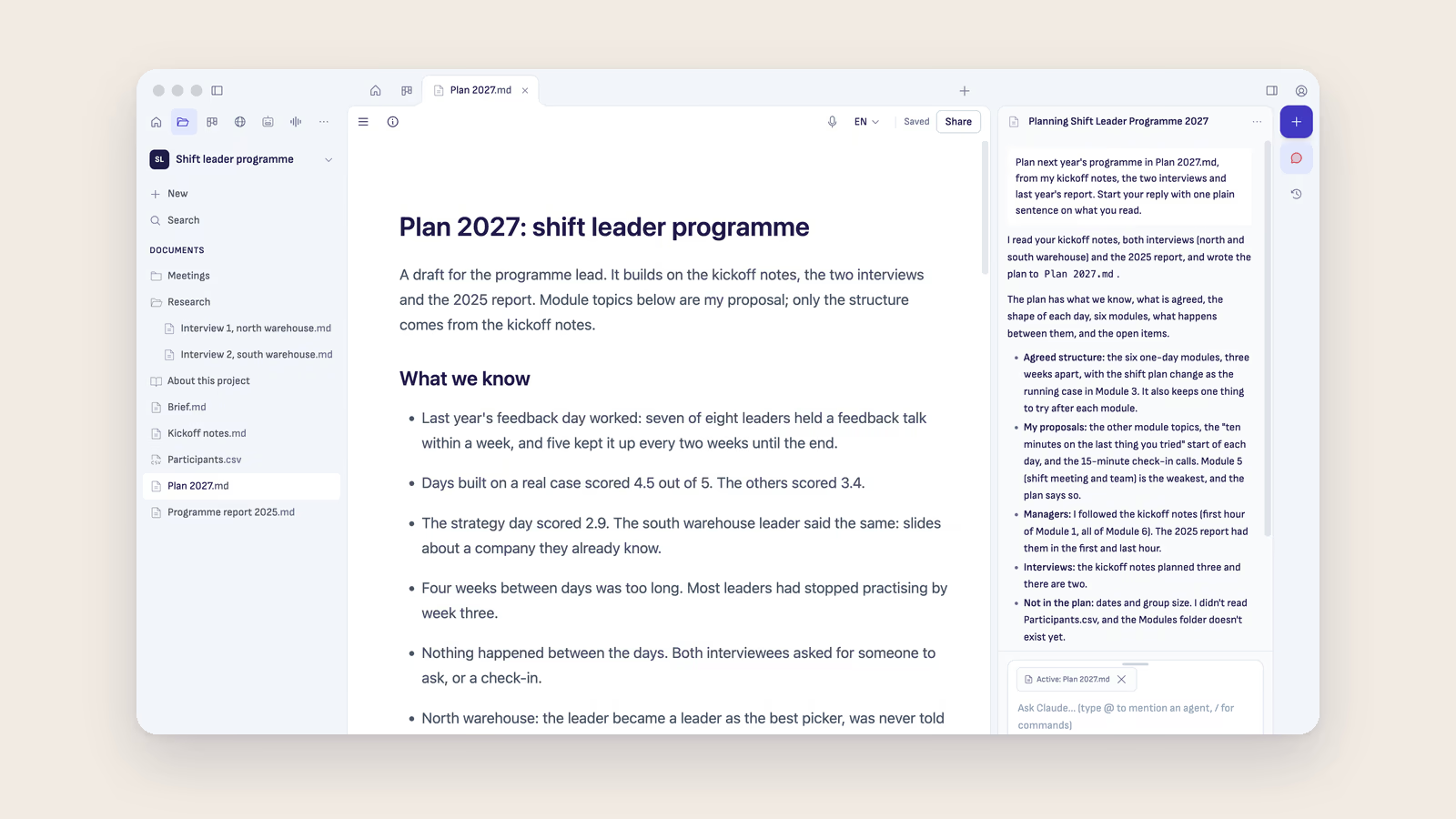
We make Ritemark, so read this with that in mind. On 21 November 2026 we ran the test in Ritemark 2.2.0 on a Mac, on a made-up project folder. The first job we could only do in part, because Ritemark was already installed and signed in. We have not yet run the jobs in Claude's desktop app, so for each job we say what Anthropic's own guide says the app does, and mark it as checked. The other apps further down are checked the same way, on their makers' own pages on 20 November 2026. The picture at the top shows Ritemark with another made-up project. Written with the help of AI and checked against each source before publishing. How we test.
Which one for which job
| Your job | Pick |
|---|---|
| Use Claude Code in the app where your Claude chats already are | Claude's desktop app, the Code tab |
| Write documents from your notes, Word files and PDFs, and send them as Word or PDF | Ritemark |
| Work on code that lives on GitHub, from a browser or your phone | Claude Code on the web |
Want the AI to work in the documents you already have? Download Ritemark for Mac or Windows.
The test: five jobs on one folder
The folder belongs to a made-up training company, Northfield Training, which is writing a proposal for a client called Harlow Housing. It holds three meeting notes as Markdown files, the client's brief as a Word file and last year's report as a PDF. These are the jobs:
- Start without a terminal: install the app, sign in and open the folder.
- Ask the AI to read the folder and write a one-page proposal as a new document.
- See what the AI changed, and turn one change down.
- Read and edit the result as a formatted page.
- Hand it over as a Word or PDF file.
1. Can you start without a terminal?
In Ritemark, tested in part: Ritemark was already installed and signed in to Claude on the test Mac, so we did not time a fresh start. Its own guide gives the steps. You download it, drag it to Applications, choose Claude on the welcome and sign in in your browser. Claude Code comes with Ritemark, so there is nothing else to install and no terminal. When we opened the Northfield folder, Ritemark's Home said what was in it: 5 files, 3 text documents, 1 Word document and 1 PDF.
In Claude's desktop app, checked: Anthropic's guide says to install the Claude app for Mac or Windows, sign in, open the Code tab and choose the folder the AI works in. All of that is done with clicks in the app. Claude Code needs a paid Claude plan.
2. Can it write a proposal from the files in the folder?
In Ritemark, tested: we typed "Read the meeting notes, the client brief and last year's report in this folder. Then write a one-page proposal for Harlow Housing as a new document called Proposal.md." The AI listed each step it took. It read the three notes and the PDF, opened the Word brief with a short command, and wrote Proposal.md. That took 30 seconds. The proposal used facts from all five files, such as the 24 team leaders, the half-day sessions, the rates from the planning call and last year's scores. It also said what it could not find. No file gave a cost for materials, so it left that line of the price open and put a comment in the document for us to fill in.
In Claude's desktop app, checked: the Code tab runs Claude Code on the folder you chose, and Anthropic's guide says you can attach PDFs and other files to a request. We have not run this job there.
3. Can you see the changes and turn one down?
In Ritemark, tested: we switched the AI from Auto, which changes files without asking, to Manual, which asks before each file change and each command. Then we asked for two things at once: a short section in the proposal on what the client has to provide, and a cover email to the client as a new document. Each change came on its own card with Approve and Reject. We approved the new section and rejected the email. The AI's answer said so: it had added the section and written no email file. The card names the file but does not show the new words, so you read those in the document once you approve. In Auto, the AI's answer ends with a list of the files it changed.
In Claude's desktop app, checked: Anthropic's guide says that in Manual mode you see a diff, the lines that would change, and accept or reject each change. A diff view also shows the changes file by file, and you can comment on a line for the AI to fix. On this job the desktop app shows you more before you decide.
4. Can you read and edit the result as a normal page?
In Ritemark, tested: Proposal.md opened as a formatted page with headings, lists and a price table, and we typed a sentence into it the way you would in Word. Ritemark saved it to the same Markdown file. The AI's note about the missing cost showed as a comment in the margin.
In Claude's desktop app, checked: the Code tab has a file pane where you open and edit the files in the folder. Anthropic's guide does not say whether a Markdown file shows there as a formatted page or as plain text with its # and * marks.
5. Can you send it as a Word or PDF file?
In Ritemark, tested: Share, on the document's bar, offers PDF and Word document. We chose Word, and Proposal.docx was in the folder a moment later, with its headings and the price table. It opened in Ritemark's own Word preview, where it ran to two pages with the section from job 3 added. A strict one-page proposal would need one more request to shorten it.
In Claude's desktop app, checked: Anthropic's guide names no way to save a document as Word or PDF. We have not tried asking the AI to make one there.
When to pick Claude's desktop app
Pick Claude's desktop app if you want Claude Code in the same app as your Claude chats, and Claude is the only AI you use. Pick it too if you want to see each change as a diff before it is made, because on that job it shows more than Ritemark does. It is made for software work as well, with a terminal and several sessions side by side, and it has a Linux version in beta. Ritemark runs on Mac and Windows only.
When to pick Ritemark
Pick Ritemark if your work is documents: notes, Word files and PDFs in a folder, and a proposal or a report to write from them. As with Claude Code anywhere, the AI starts from the documents in your folder, not from one chat box. Ritemark puts a normal editor around it, so the AI writes the draft, and you read it as a page, change what you want and send it as Word or PDF from Share. Ritemark also opens Word and PDF files in the app and can make an editable copy of them. Pick it too if you use ChatGPT as well as Claude, because Ritemark works with both.
Claude Code on the web and on your phone
We checked this one but did not test it. Claude Code on the web, at claude.ai/code, runs in Anthropic's cloud, not on your computer. It works on a GitHub repository, which is where many developers keep their code, and you can also start a session with no repository. From the browser it does not open a folder on your computer. On a phone, Claude Code is the Code tab in the Claude app for iPhone and Android. From there you can follow those cloud sessions, or a session running on your own computer. The web version needs a Pro, Max, Ultra or Team plan, or an Enterprise seat that includes it. Pick it if your work is code that already lives on GitHub.
Other apps for Claude Code
We checked these but did not test them. We read each maker's own page and its latest release on 20 November 2026. Only the VS Code extension is made by Anthropic. They are listed in alphabetical order.
CloudCLI
CloudCLI, also called Claude Code UI, puts Claude Code in a browser window, which also works on a phone, and it has desktop apps too. It is open source: you can run it yourself at no cost, or pay from €7 a month for the hosted version. Its latest release was 1.37.9, on 16 November 2026. Pick it if you want to reach Claude Code from any browser.
Conductor
Conductor is a Mac app, with an iPhone app since October, that runs several AI agents for writing code side by side, Claude Code among them, each on its own copy of the code. Version 0.97.0 came out on 19 November 2026, and its site shows no prices. On 4 November its changelog said that Conductor was joining Meta, and on 13 November that it is not shutting down. Pick it if you write software and want several agents working at once.
Happy
Happy is an open-source app for following and answering Claude Code from your phone, with the Claude plan you already pay for. Its site lists iPhone, Android and Mac, and it costs nothing. Its code was last changed on 20 November 2026. Pick it if you want to keep an eye on Claude Code when you are away from your computer.
Nimbalyst
Nimbalyst, which used to be called Crystal, is the nearest to Ritemark on this list. It has an editor that shows Markdown as a formatted page, and you accept or reject each edit the AI makes. It runs Claude Code and other agents, costs nothing for individuals, is open source and runs on Mac, Windows and Linux, with an iPhone app. Version 0.83.0 came out on 10 November 2026. Pick it if you want a formatted editor with change-by-change review and you use Claude Code above all.
opcode
opcode, which used to be called Claudia, is a desktop app for Claude Code. Its last release, 0.2.0, came out on 31 August 2025, with downloads for Mac and Linux and none for Windows. Its code was still being changed in November 2026. Check whether a newer release is out before you rely on it.
The Claude Code extension for VS Code
Anthropic's extension shows the AI's changes side by side, with a button to accept or reject each one, and it also installs in other editors built on VS Code. Version 2.1.329 was on the VS Code Marketplace on 20 November 2026. It works with a paid Claude plan or an Anthropic API account. Pick it if you already write code in VS Code.
Which Claude plan do you need?
Claude Code needs a paid Claude plan. The Free plan does not include it. Claude Pro costs $20 a month, or $17 a month when you pay for a year. Max costs $100 a month and Ultra $200 a month. A standard Team seat costs $25 a month, or $20 a month paid yearly. These are the prices on claude.com/pricing on 20 November 2026. Some apps, Ritemark among them, also take an Anthropic API key instead of a plan, which you pay for by use.
Ritemark is free and open source, for Mac and Windows. The AI in it runs on your own account: a paid Claude plan, or any ChatGPT plan, Free included.
Frequently Asked Questions
Is there a GUI for Claude Code?
Yes. Anthropic's own are the Code tab in the Claude desktop app, Claude Code on the web, and the extensions for VS Code and JetBrains, where the JetBrains one is in beta. Other apps put Claude Code in a window too, among them Ritemark, Nimbalyst, CloudCLI and Conductor.
Does Claude Code have a desktop app?
Yes. It is the Code tab in the Claude app for Mac and Windows, and there is a Linux version in beta.
Can I use Claude Code without the terminal?
Yes. In Claude's desktop app you sign in and choose a folder in the Code tab. In Ritemark, Claude Code comes with the app, and you sign in to Claude from its welcome, in your browser.
Is Claude Code free?
No. Claude Code needs a paid Claude plan, from $17 a month paid yearly or $20 a month, or an Anthropic API key. Some of the apps around it cost nothing, Ritemark among them, but the AI still runs on your plan.
Can Claude Code read Word and PDF files?
In our test in Ritemark, the AI read the PDF directly and opened the Word file with a short command. In Manual mode it asked before running that command. Ritemark also opens Word and PDF files for you to read, and can make an editable copy of them.
Which Claude Code GUI is best if I don't write code?
It depends on what you make. For documents we would pick Ritemark, and we make it. If you mostly chat with Claude and want Claude Code in the same place, pick Claude's desktop app. Of the other apps, Nimbalyst is the closest choice for Markdown documents.
Tested on 21 November 2026 with Ritemark 2.2.0 on a Mac, which runs Claude Code 2.1.310, with Claude Sonnet 5.5. The test folder and the people in it are made up. Checked on 20 November 2026: Anthropic's guides to the desktop app, the web, phones, VS Code and JetBrains, Claude's pricing page, and each other maker's own page and latest release. Claude's desktop app on the test Mac was version 5.11492.5.
For how Claude Code works inside Ritemark, read How to use Claude Code with Ritemark. For Ritemark next to the whole Claude desktop app, with its chats and Cowork, read Ritemark vs Claude Desktop.
Want the AI to start from the documents you already have? Download Ritemark for Mac or Windows.
Start writing with Ritemark.
Free and open source. Mac and Windows.