A normal consulting morning has two clients in it, sometimes three. At nine I review a draft for one. At ten the other one calls with a question about last week's proposal. At eleven I am back in the first, trying to remember which file I had open and what I asked the AI to do.
The switch is where time goes. Each client lives in its own folder, and I wrote about why that folder should be the AI's boundary too in One Client, One Folder. But keeping clients apart is only half of it. The other half is moving between them ten times a day and finding each one where you left it.
Every client on one list
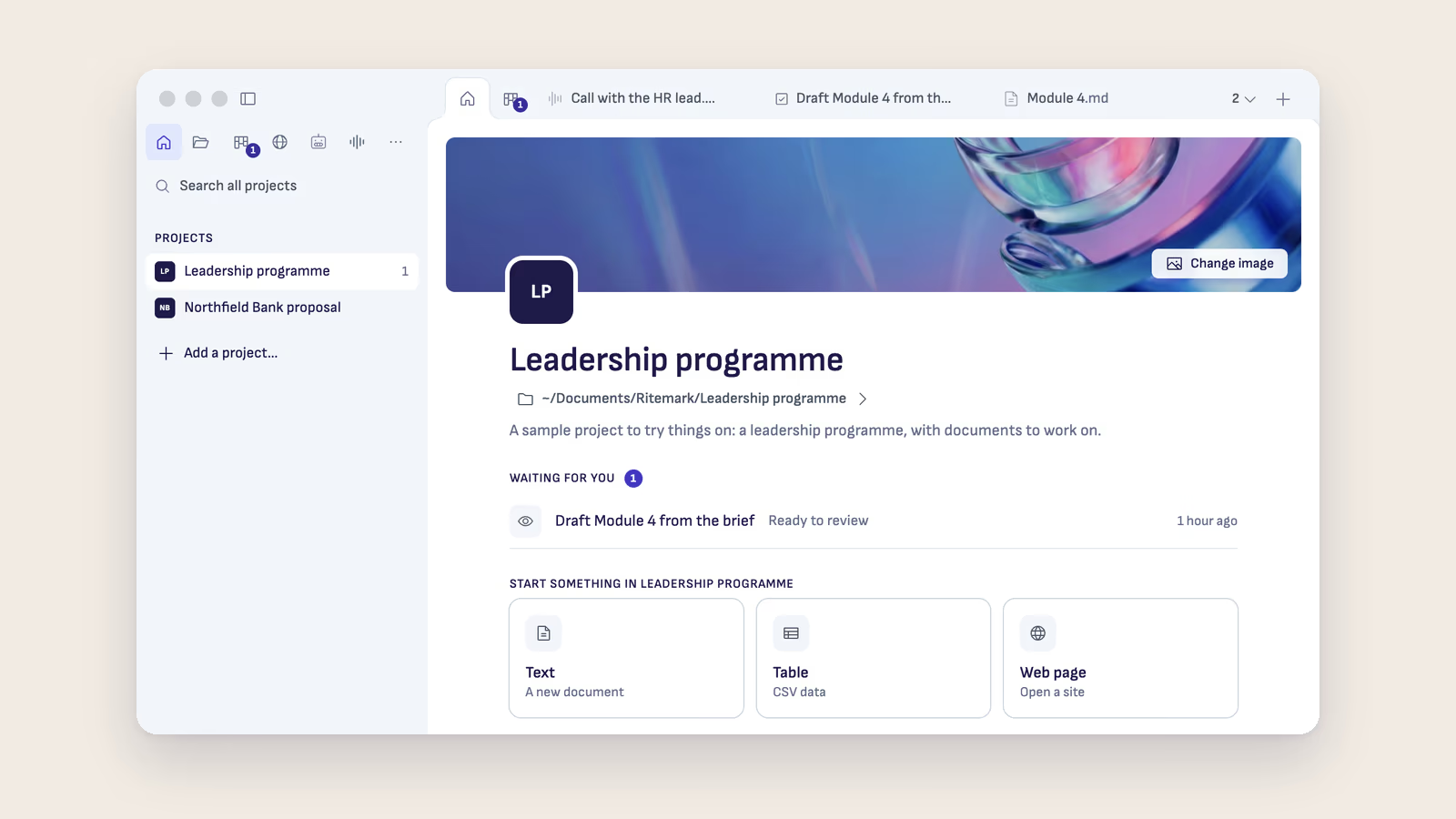
Ritemark 2.0 puts your projects on Home. A project is a folder, so in practice it is one per client or one per engagement. The left column lists them, and each one shows how many things wait for you in it.
The picture above is Ritemark's sample project with a second one beside it. Leadership programme has a 1 next to its name. Northfield Bank proposal has nothing. Before I open anything, I know where my attention is needed. The Home of the open project says what that one thing is: a draft of Module 4 that the AI finished an hour ago and that is ready for me to review.
I used to keep that list in my head, or in a note that was out of date by Tuesday. Now it is the first thing I see.
Switch, and come back to the same place
Click a project and the window switches to it. Each project keeps its own tabs. When I come back to the first client after the call, the draft is open where I left it, with the same chat beside it. Home also offers Go back, which takes me to the project I was just in.
If I want both clients on screen at once, for example to copy a structure from one proposal into another, Option-click (Alt-click on Windows) opens a project in a new window. Most of the time I don't. One window and a fast switch is calmer.
When the AI is still working
Here is the case I was worried about. I ask the AI to draft something for client A, it starts working, and then client B calls. If I switch, what happens to the draft?
Ritemark asks first. When a chat is still working and you switch projects, it says so before it stops anything. You can choose Open in a new window, and the AI finishes in client A's window while you take the call in client B's. When you go back to client A, the answer is there.
What stays separate
Each project has its own Home, its own task board and its own page about the project, which both Claude and ChatGPT read. That page is where I write who the client is, what the engagement is about and how they like their reports. Because it belongs to one folder, the AI never brings the bank's tone into the leadership programme.
The list of projects stays on your computer. It is filled from the folders you have opened before, and you add a new one with Add a project.
What it does not do
It is still one person's tool. The client does not see your Home, and there is no shared view of the projects with your colleagues. If a project folder moves, it stays on the list marked Not found until you point Ritemark at the new place. And the waiting list only knows about tasks and chats inside Ritemark. A call you promised to return is still on you.
For me the change is small and daily. I spend less of the morning finding where I was, and more of it on the work the client pays for.
If you do client work, the consultants page shows how engagements, interviews and reports fit into Ritemark.
Start writing with Ritemark.
Free and open source.