Every documentation set I have worked on had one odd page. The setup guides for four platforms follow the same order: what you need, install, sign in, check that it works, what to do when it does not. Then the fifth platform arrives a year later, someone writes it in a hurry, and it opens with troubleshooting and has no "check that it works" at all. Readers notice. They came from page two, they know where to look, and the thing they are looking for is not there.
Keeping pages alike is most of the craft, and it is the part an AI draft is worst at when you ask in the usual way. "Write the setup guide for Linux" gets you a reasonable setup guide. It is just not your setup guide. The headings are different, the steps are numbered differently, the warning sits in the wrong place.
Point at a page that already works
The fix I use now is boring. I do not describe the shape. I point at it. "Write the Linux guide in the same shape as the Windows guide" works better than any template I have tried to explain in words, because the agent reads the real page: its headings, how long each section is, where the screenshots go, how the last section hands over to the next page.
In Ritemark the docs live in a folder on my computer, and the agent works in that folder. It can open the Windows guide, the style file at the root and the release notes for the version it is writing about. I do not paste anything into a chat window, and the agent does not guess what the other pages look like.
Read the plan before it writes
The second half matters as much. Before the agent writes the new page, I ask it to plan first. It reads the sources and comes back with what it will create and what it took from where, and nothing in the folder changes until I approve.
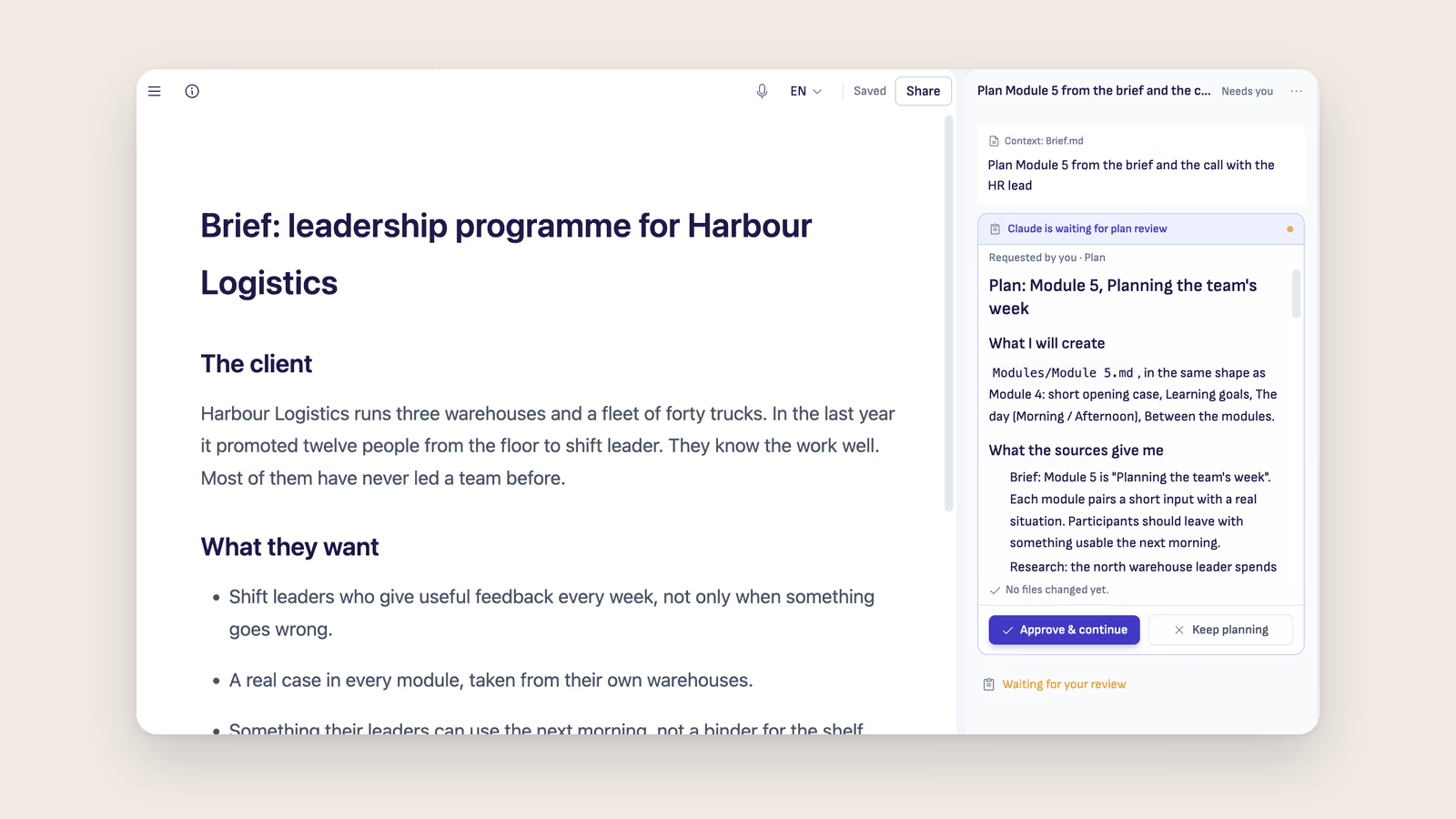
The screenshot above is from a training project, not a docs set, but it shows the moment well. Claude was asked to plan Module 5 from the brief, and the plan says it will make Modules/Module 5.md "in the same shape as Module 4", then names the sections it will copy. Under it is a list of what the sources give it. The bottom line says no files have changed yet. There are two buttons, Approve & continue and Keep planning.
For a docs page that plan is where I catch most problems. If it lists "Troubleshooting" as the second section, I know it read the wrong guide. If it says the Linux version needs a sign-in step that the release notes never mention, I ask where that came from. Correcting a plan of ten lines takes a minute. Correcting a finished page that drifted takes an evening, because the drift is spread across every section.
What it does not fix
The shape is the easy half of consistency. The agent copies headings and order well. It is less reliable with the small habits inside the sections: whether you write "select" or "click", whether every step ends with what the reader should see. The style file at the root of the folder covers some of that, and I still read the result the way I would read a colleague's first draft.
It also copies mistakes faithfully. If the Windows guide has a weak section, the Linux guide will have the same weak section. Sometimes that is the moment to fix the model page first and then ask again.
What I get back is time I used to spend making page five look like pages one to four. I spend it instead on whether the steps are right, which no plan can check for me.
If you write docs, the technical writers page shows release notes, API docs and knowledge base work in Ritemark, and The Style Guide Your AI Never Read explains the file that sits at the root of the folder.