Every writing app is only as good as the foundation underneath it. You don't notice a solid foundation when it's working -- but you definitely notice when it's not. Slow rendering, occasional glitches, things that feel slightly off. That's what happens when the engine falls behind.
Ritemark v1.5.0 is a foundation release. We upgraded the underlying VS Code base from 1.94.0 to 1.109.5 -- months of upstream stability work absorbed in one update. On top of that, we built a proper Update Center so you always know what version you're running, redesigned the Welcome Page to help you get started faster, and overhauled AI agent reliability on Windows so Claude and Codex actually work there now.
VS Code Foundation: From 1.94.0 to 1.109.5
Ritemark is built on VS Code OSS, the same open-source editor that powers millions of development workflows. When we forked it, we were on version 1.94.0. That was solid, but the VS Code team ships improvements every month -- editor performance, rendering fixes, accessibility, extension API updates. Over time, the gap grows.
With v1.5.0, we jumped forward to 1.109.5. That's not a single update -- it's the accumulated work of many monthly releases, each bringing its own stability and performance gains. We revalidated our entire patch stack against the new base to make sure every Ritemark-specific feature works correctly on the new foundation.
You won't see a flashy new button for this change. What you'll notice is that everything feels a little smoother, a little faster, a little more reliable. That's the point.
Update Center: Know What You're Running
Until now, checking for updates in Ritemark was passive. The app would notify you when something was available, but you had no control over the process. No way to manually check. No way to skip a version. No visibility into what components were up to date.
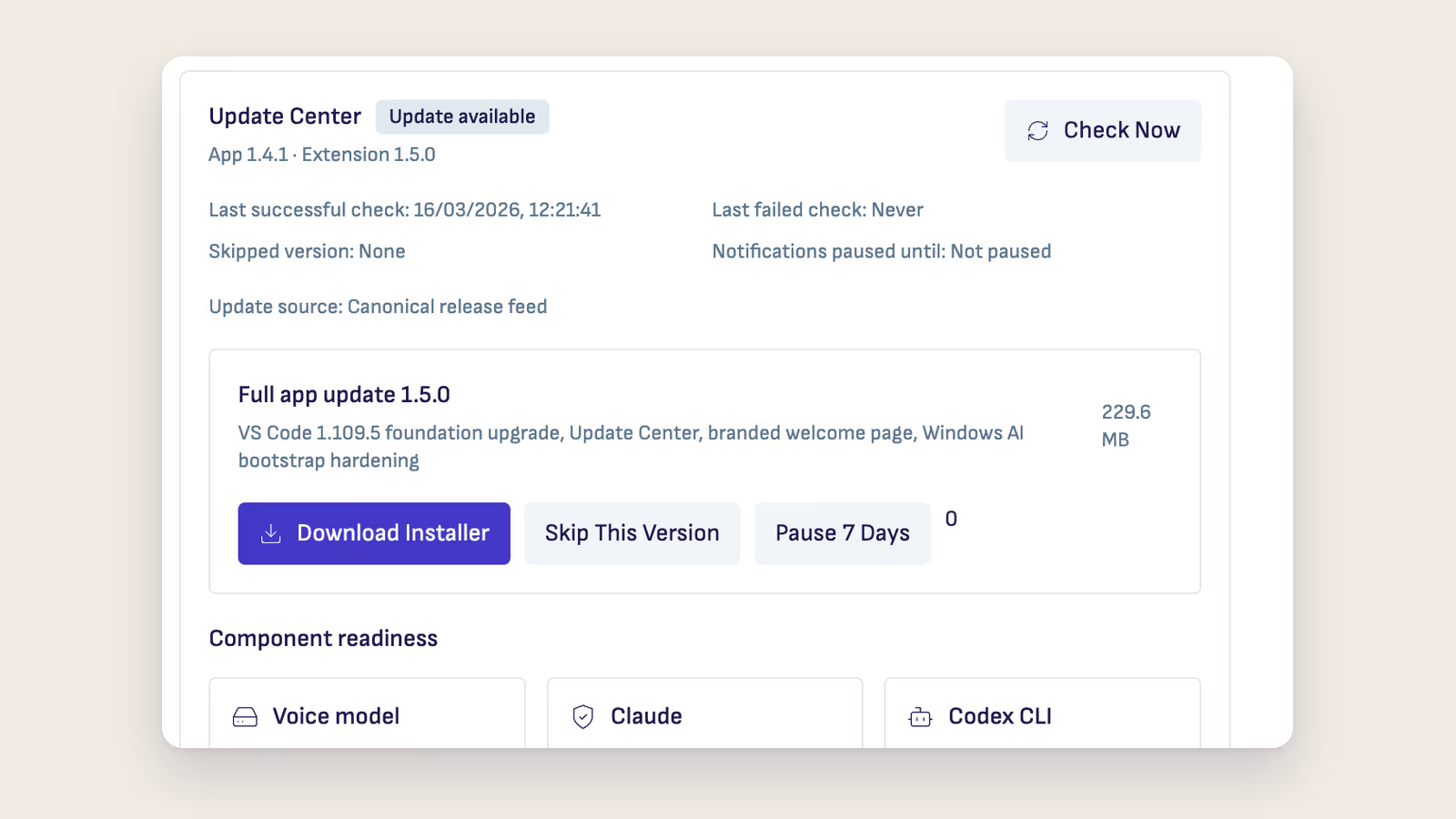
The new Update Center in Settings changes that. You can manually check for updates whenever you want. When an update is available, you can install it, pause the download, resume it later, or skip that version entirely. Component status cards show you the state of your voice model, Claude CLI, and Codex CLI at a glance -- whether they're installed, up to date, or need attention.
This matters because Ritemark isn't just one binary. It's a collection of components that work together: the editor, the AI agents, the voice model. The Update Center gives you a single place to see the health of all of them.
Redesigned Welcome Page
The first thing you see when you open Ritemark now looks different. The new Welcome Page leads with "Write Smarter. Think Faster." and immediately shows you what's ready and what's not.
A launch check panel displays the status of Claude, ChatGPT, Git, and Node.js -- the tools that power Ritemark's AI features. Green means ready. If something needs setup, you see exactly what to do. No more opening Settings and hunting through sections to figure out why an agent isn't responding.
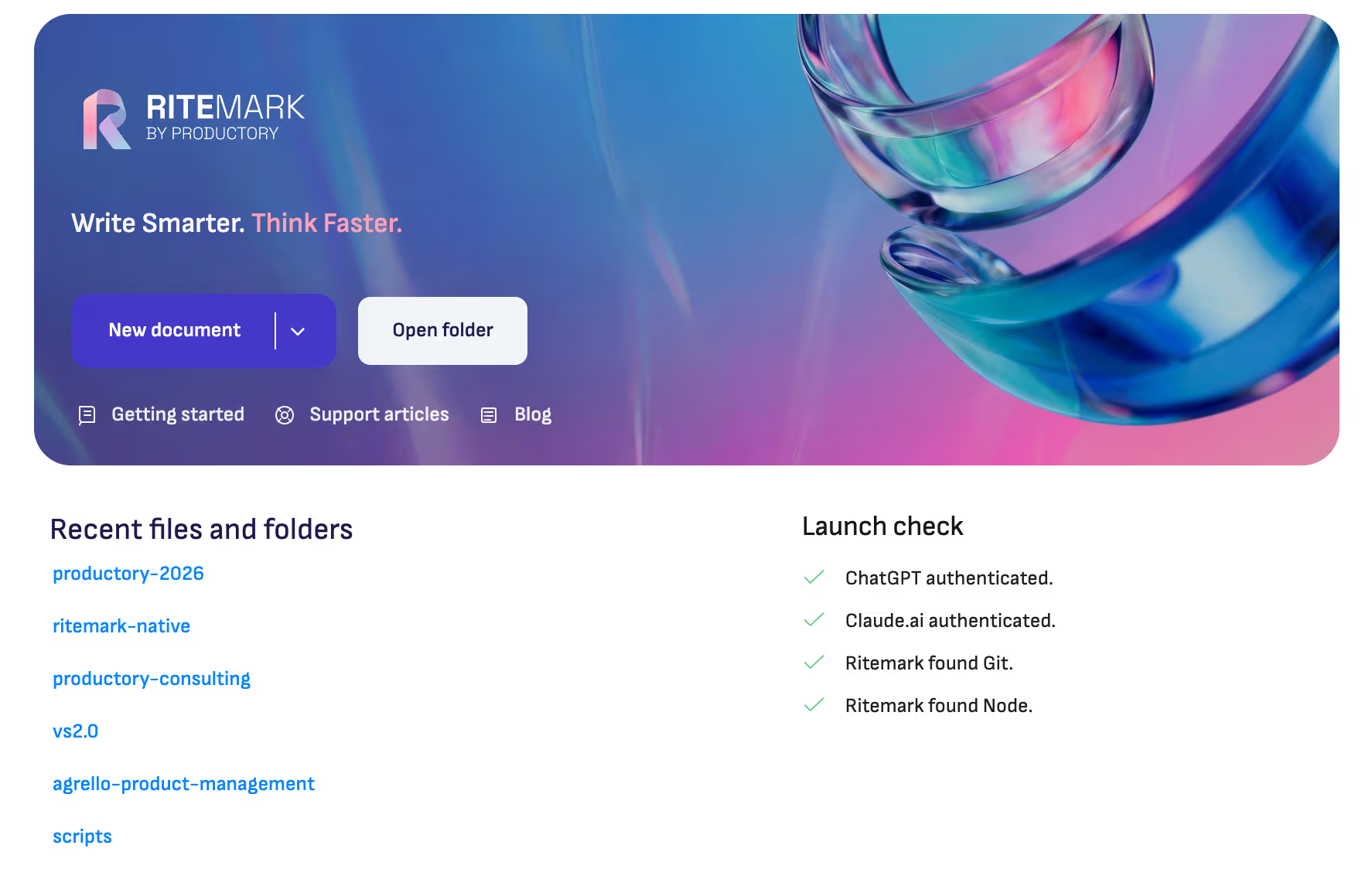
Below the status checks, quick-action buttons let you jump straight into work: create a new document, open a table, start a Flow, or open a folder. Recent files are one click away. The goal is simple -- get you from launch to writing as fast as possible.
AI Agent Setup: Clear and Recoverable
Setting up AI agents used to involve some guesswork. Is Claude installed? Is the API key valid? Why isn't Codex responding? The error messages weren't always helpful, and recovery paths weren't obvious.
v1.5.0 adds dedicated Claude Account and ChatGPT Account sections in Settings. Each section shows your authentication method, CLI version, billing source, connection status, and plan type. When something breaks -- and software does break -- you see a clear state description (broken install, needs authentication, outdated CLI) with a specific action to fix it.
Settings and the AI sidebar now stay in sync in real time. Change your API key in Settings and the sidebar reflects it immediately. No more restarting the app to pick up configuration changes.
Windows: From "Experimental" to "Reliable"
Ritemark has had Windows builds for several releases, but let's be honest -- the AI agent experience on Windows was rough. Claude and Codex had issues with binary detection, chat spawning threw "EINVAL" errors, and concurrent install attempts could lock files and leave things in a broken state.
We went through every failure mode systematically. Binary detection now correctly resolves .cmd and .exe shims. The Claude chat spawn error is fixed by properly resolving .cmd wrappers to their underlying cli.js. Install operations prevent file locks from concurrent attempts. And before any agent starts, Ritemark checks for environment prerequisites -- Git, PowerShell, Node.js -- and tells you exactly what's missing.
The Windows download is the standard Ritemark-Setup.exe installer.
Bug Fixes
The Codex approval dialog had four separate bugs that were blocking user approvals in certain scenarios. All four are fixed. Screenshot and image attachments sent to Codex now reach the agent correctly -- previously they could get lost in transit. Misleading per-image token estimates have been removed from the Codex chat interface. The CSV editor's column headers no longer interfere with sorting.
Download
The update is available for all platforms:
| Platform | File |
|---|---|
| macOS Apple Silicon (M1/M2/M3/M4) | Ritemark-arm64.dmg |
| macOS Intel | Ritemark-x64.dmg |
| Windows | Microsoft Store |
Windows users: Ritemark is now in the Microsoft Store, which installs it for you. (Updated September 2026.)
If you're already using Ritemark, the new Update Center will notify you when v1.5.0 is ready. New users: download and see how a solid foundation makes everything better.
FAQ
What are the main updates in Ritemark v1.5.0?
Four areas: the VS Code foundation jumps from 1.94.0 to 1.109.5 for better stability, a new Update Center in Settings gives you control over updates and component status, the Welcome Page is redesigned with launch checks and quick actions, and AI agent reliability on Windows is completely overhauled.
What changed with the VS Code foundation?
The underlying editor engine was updated from VS Code OSS 1.94.0 to 1.109.5. This brings months of upstream improvements to rendering, performance, accessibility, and extension APIs. Ritemark's full patch stack was revalidated against the new base.
How does the Update Center work?
Open Settings and look for the Update Center section. You can manually check for updates, install them, pause or resume downloads, and skip versions you don't want. Component cards show whether your voice model, Claude CLI, and Codex CLI are up to date.
What's new on the Welcome Page?
The Welcome Page now shows a launch check panel with the status of Claude, ChatGPT, Git, and Node.js. Quick-action buttons let you create documents, tables, Flows, or open folders immediately. Recent files are accessible in one click.
Is Windows now fully supported?
Windows support is significantly improved. AI agent binary detection, chat spawning, and installation are all reliable now. The Windows download is the standard Ritemark-Setup.exe installer. Voice dictation remains macOS-only for now.
Will my settings be preserved when updating?
Yes. All your settings, documents, Flows, chat history, and AI configurations carry over. There are no breaking changes in v1.5.0.
Is Ritemark free?
Yes, Ritemark is free and will remain free. Using AI agents requires an Anthropic API key or a paid Claude.ai subscription for Claude Code, or a paid ChatGPT account for Codex.
Where can I find previous release notes?
All Ritemark updates are available on the Ritemark blog. v1.4.1 added Codex agent and plan mode, v1.4.0 brought Claude Code to the sidebar, v1.3.0 added the document workspace, v1.2.0 introduced Flows.