There is a moment in every engagement that nobody puts in the project plan. The report is written. It is due on Thursday. On Wednesday evening you read it from the first page to the last, the way the client's board will read it, and you start leaving notes.
"Too vague." "Is this number from the March interviews or the survey?" "They say members, I wrote customers again." "This paragraph says the same thing as the one above."
An hour later the draft has thirty notes in the margin, and the real work of the evening begins. You now have to do everything you just told yourself to do.
Two kinds of notes
If you look at those thirty notes honestly, they fall into two piles.
The first pile is small and mechanical. Shorten this. Use the client's word. Make these four bullets parallel. Check that the figure in the summary matches the one in the appendix. You know exactly what the result should look like, you just have not done it yet.
The second pile is the reason the client hired you. Is the second recommendation too blunt for this board? Should the finding about the regional office be in the report at all, or said in the room? No tool should answer those, and a good consultant would not want one to.
The trouble is that the first pile eats the evening. By the time you reach the questions that need a clear head, it is half past eleven and you settle for "good enough".
Why the chat window does not help much here
You could take the small notes to a chat assistant. Most people who try it stop after the fourth note.
Each one is a round trip. Copy the paragraph, paste it, explain what the report is and who it is for, ask for the change, copy the answer back, fix the formatting that got lost on the way. Then find your place in the document again. For one note that is fine. For twenty it is slower than doing the edits by hand, and somewhere around the tenth you paste a new paragraph over the wrong old one.
The notes themselves were never the problem. They are short and clear, and they sit right next to the text they are about. What is missing is a way to hand them over where they already are.
Leave the note where it is
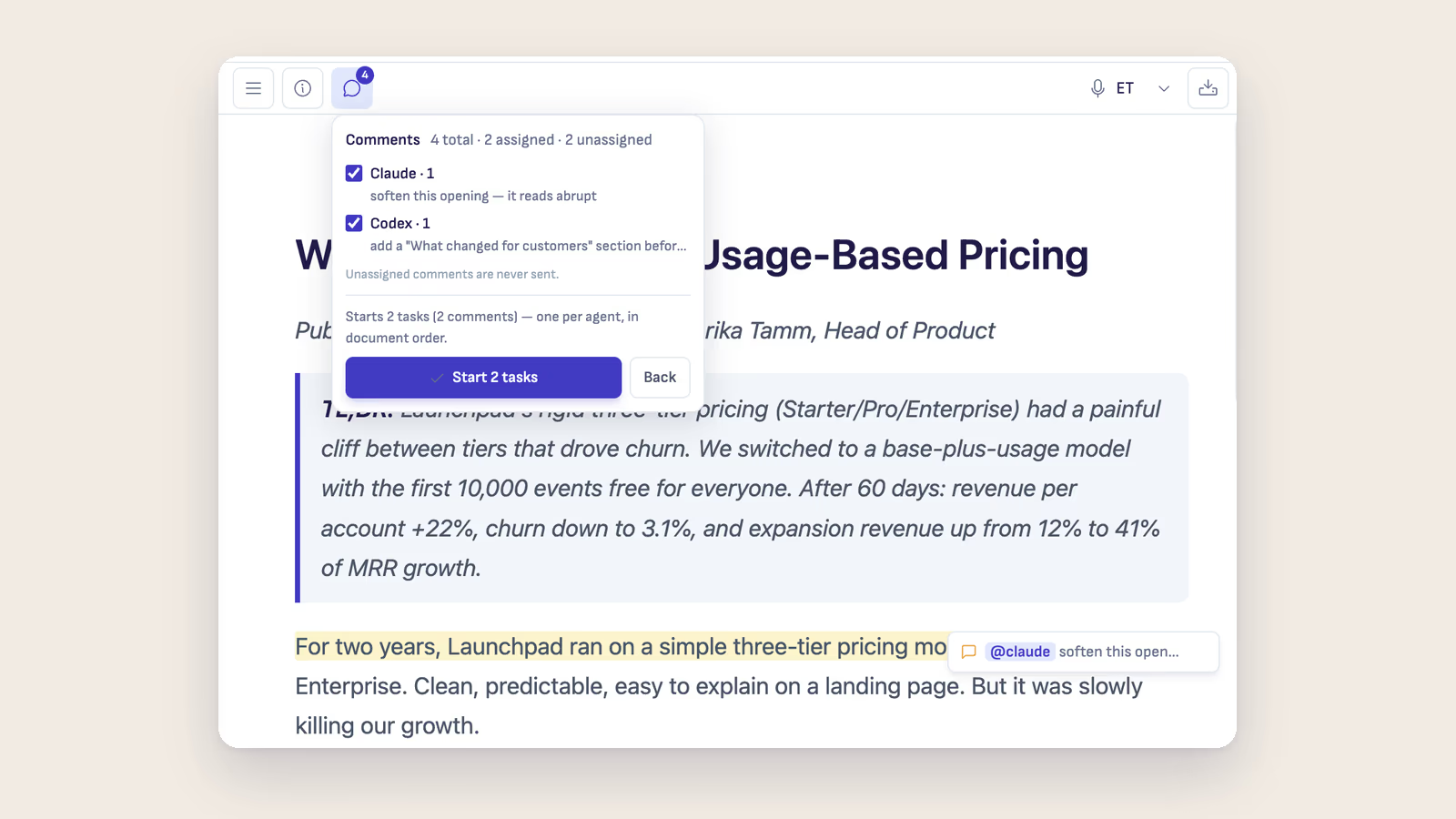
In Ritemark the read-through works the way it does on paper. Select a passage, click Comment, write the note. It appears in the margin next to the text, and the passage gets a highlight so you can see what the note refers to. If the note is about a spot and not a sentence, type /// and write it there.
So far this is a pen. The difference comes when you decide who a note is for.
Write @claude or @codex anywhere in a note and that note becomes a job for the agent. "@claude shorten this to two sentences, keep the number." The agent gets your instruction and the exact passage you marked, along with the name of the document, so there is nothing to copy and nothing to explain again. If the engagement folder has an AGENTS.md or CLAUDE.md with the client's rules in it, the agent starts from those as well.
A note with no mention stays a note. The Comments menu in the toolbar counts both kinds and says it in so many words: "Unassigned comments are never sent." That line is what makes the two piles work. "Too blunt for this board?" is yours, and it stays yours until you have thought about it.
When you finish reading, open the Comments menu. It lists the assigned notes under each agent, so you see what is about to go out. Press Send assigned comments to AI, check the list once more, then Start tasks. The agent works through its notes in document order.
What comes back
Each comment reports on its own job. It tells you when the agent has accepted the work and when it is on it. If the agent has a question or wants a go-ahead, the comment says Needs your input. When the job is finished, a short summary of what the agent did appears under your note, with Open conversation if you want to see the whole exchange.
Your note is never rewritten and never removed for you. You read the changed passage, decide whether it is what you asked for, and click Mark as done yourself. If the result is wrong, the note is still there and you can say so.
This is the part I would ask you to take seriously. A note like "check this figure against the interview notes" is a fair thing to hand to an agent that can read the files in the folder. The answer is still a claim, and it goes into a report with your name on it. Read what it changed.
What this does not do
Comments in Ritemark are between you and the agent. They are not a shared review with a colleague or a client: nobody else sees your margin, and the agent answers with one short summary, not a thread. If a partner reviews your drafts, their feedback still arrives the way it does today, and you can turn it into notes of your own.
When you send a comment to an agent, the passage and your note go to the AI provider you chose, under your account and that provider's terms. If the engagement does not allow client material to go to an AI service, the margin does not change that.
And the comments are stored inside the Markdown file. That is useful, because they are still there tomorrow morning, and it would be a problem if they followed the report out of the door. They do not: Export PDF and Export Word leave the comments out. "Too blunt for this board?" does not reach the board.
The evening you get back
Nothing here makes the read-through shorter. You still read every page, and you should.
What changes is what happens after it. The small pile runs while you make coffee, and you check the results the way you would check a junior colleague's edits. Then you sit down with the five or six notes that have no mention in them, at an hour when you can still think.
Those five or six notes are the engagement. The rest was typing.
If you want the step-by-step version, the Comments guide covers every button and status, and the consultants page shows how the rest of an engagement fits around it.