The same steps, every single release
Technical writers have routines. When a new version ships, the steps are almost identical every time. Read the changelog. Identify user-facing changes. Draft release notes. Check if any existing docs reference changed behavior. Update those docs. Review everything. Publish.
It is not complicated work. But it is repetitive, and it takes time. A quarterly release might involve an hour of changelog reading, two hours of drafting, and another hour of checking existing docs for affected pages. Multiply that by four releases a year, or twelve if you ship monthly, and the mechanical parts add up quickly. The real problem is not that any single step is hard. It is that doing the same sequence manually, every time, leaves room for skipped steps and inconsistent results.
Flows turn a checklist into an automation
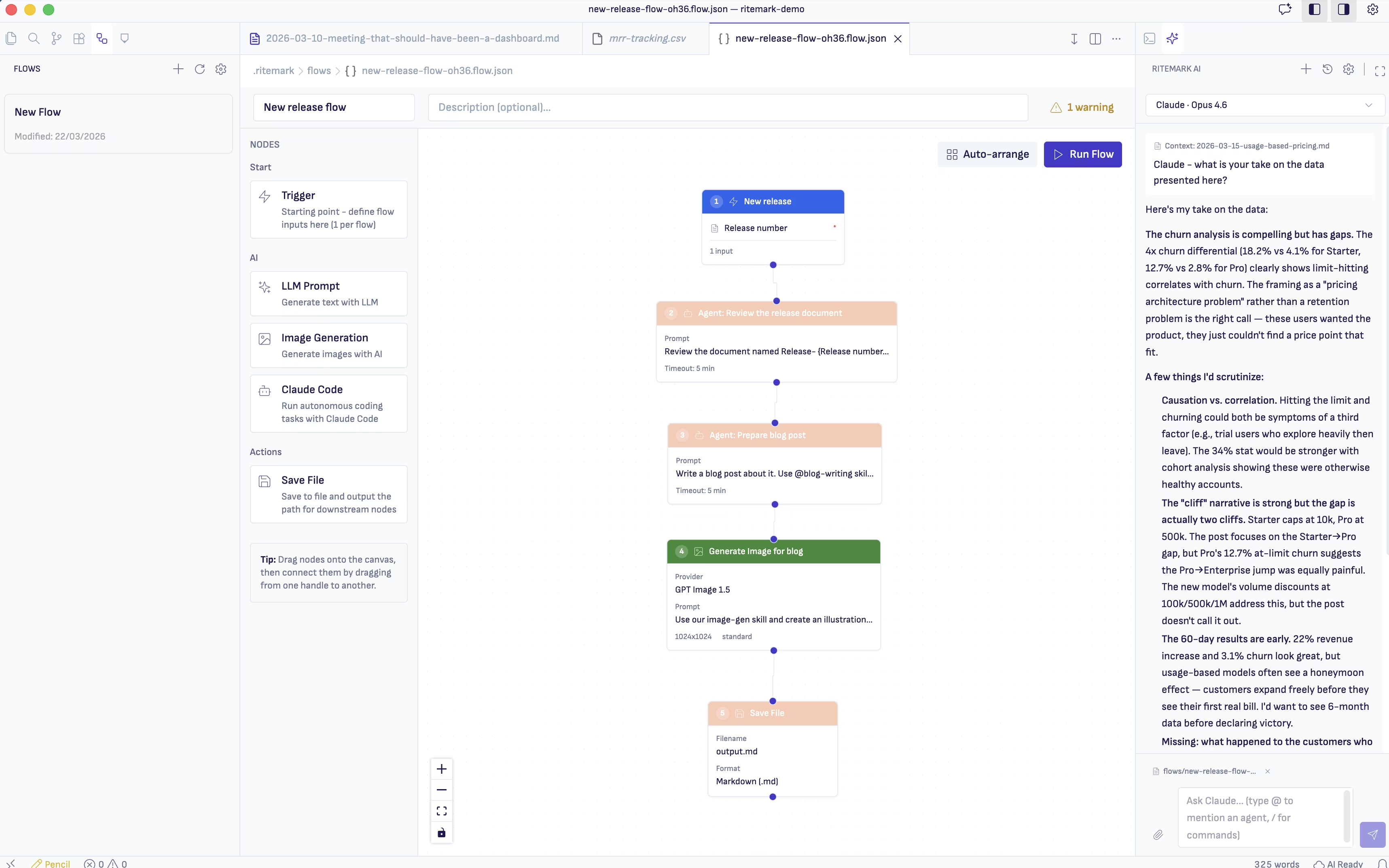
Ritemark Flows let you define a sequence of agent tasks that run together. Instead of opening the AI sidebar and typing instructions for each step, you build a flow once and run it whenever a release happens.
A documentation release flow might look like this: Step one, read the changelog file and extract user-facing changes. Step two, generate a release notes draft using the template and previous notes for tone matching. Step three, scan the existing documentation folder for articles that reference any changed features or endpoints. Step four, produce a summary of which docs need updating and what specifically changed.
You set this up once in the Flows editor. Each step feeds its output into the next. When v3.4 ships, you drop the changelog into your project folder, run the flow, and get a release notes draft plus an impact report on existing docs. The mechanical work happens automatically. You spend your time on review and editing, the parts where human judgment actually matters.
Building a flow for release documentation
For example, a technical writer at a fintech company could set up a release documentation flow like this.
She creates a flow with four steps. The first step reads the new changelog and categorizes each item as user-facing or internal. The second step takes only the user-facing items and drafts release notes, reading the template file and the last two release notes for style reference. The third step takes the list of changed features and scans every file in the docs folder for mentions of those features. The fourth step compiles everything into a single report: here are your draft release notes, and here are the existing docs that need attention.
Say her release documentation takes about four hours per monthly release. The flow runs in a few minutes and gives her a draft to review, so her time goes into reading and correcting instead of sorting. She still makes judgment calls, rewords things, adds context the changelog does not capture. But the sorting, cross-referencing, and first-draft writing happen without her doing each step manually.
Repeatable processes, not one-off prompts
The difference between typing instructions into the AI sidebar and building a flow is the difference between a one-off task and a repeatable process. Chat instructions work great for ad-hoc questions and exploration. But when you do the same documentation sequence every release, typing the same prompts each time is wasted effort.
Flows save the sequence. They ensure every step runs in order, every time, with consistent instructions. No step gets skipped because you were in a hurry. No inconsistency because you worded the prompt slightly differently this month. The flow runs the same way whether it is your first release or your fortieth.
Start writing with Ritemark.
Free and open source.