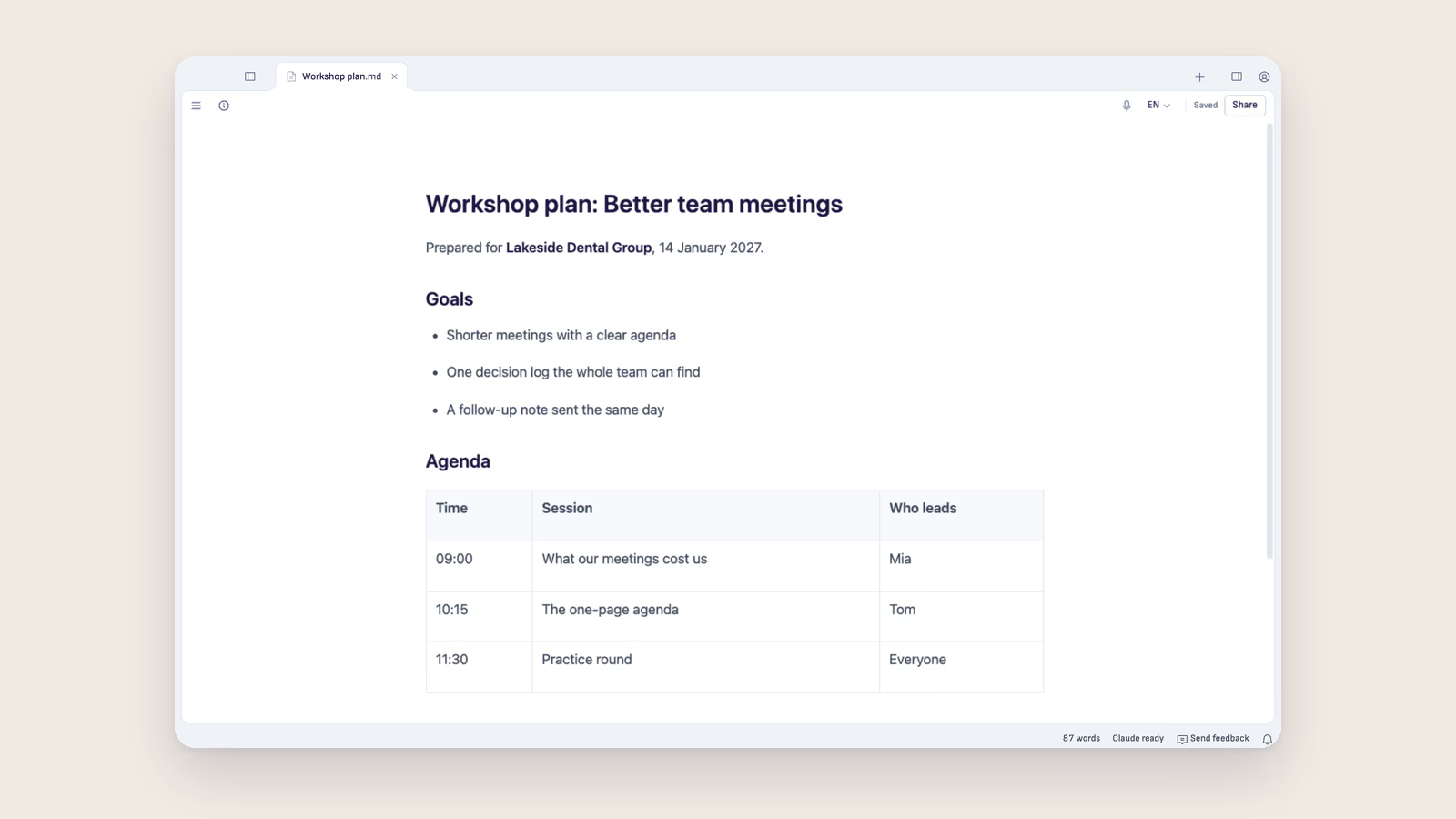
To read an .md file as a normal page, open it in an app that shows Markdown formatted. Ritemark opens it as a page you can read and edit, on Mac and Windows: on a Mac, right-click the file, choose Open With and pick Ritemark. On Windows 11, a current Notepad may show it formatted too. On a Mac, Quick Look showed only the plain text in our test.
An .md file is a Markdown file. It is plain text with a few marks in it: a # before a heading, two stars around bold words, a dash before each item in a list. You may have one from ChatGPT or Claude, from a colleague or from a website. Any text app opens it, but then you read the marks too. On 24 November 2026 we opened the same file in three apps on a Mac and show you below what each one looks like.
We make Ritemark, so read this with that in mind. Written with the help of AI and checked against each source before publishing. How we test.
Which app to use
| You want to | Use |
|---|---|
| Read the file as a page and edit it, on Mac or Windows | Ritemark |
| Read it on Windows 11 without installing anything | Notepad, if yours has the formatted view |
| Keep it with your notes in a notes app | Obsidian |
| Work on it next to code | Visual Studio Code, with its preview |
Want to read your .md file as a normal page? Download Ritemark for Mac or Windows and open the file in it.
Why does my .md file look strange?
Your .md file looks strange because the app you opened it in shows the Markdown marks instead of the formatting they stand for. The text is all there. A heading shows as a line that starts with #, bold words sit between two stars, and a table is a row of words split by straight bars. An app that understands Markdown reads those marks and draws a heading, bold text and a table instead.
This is what our test file looked like in Google Chrome 158 on the Mac when we opened it there. Quick Look, the Mac's own preview of a file, showed it the same way on macOS 26.5.1.

How to open an .md file in Ritemark
Ritemark opens an .md file as a formatted page that you can also edit, and it saves your changes back into the same .md file.
On a Mac, install Ritemark, then right-click the .md file in Finder, choose Open With and pick Ritemark. We opened our file in Ritemark 2.3.0 the way Open With hands a file to an app: it opened on its own in one window, with the title as a large heading, the client's name in bold, the list as bullets and the table drawn as a table. The checklist showed tick boxes and the tip showed as a quote.
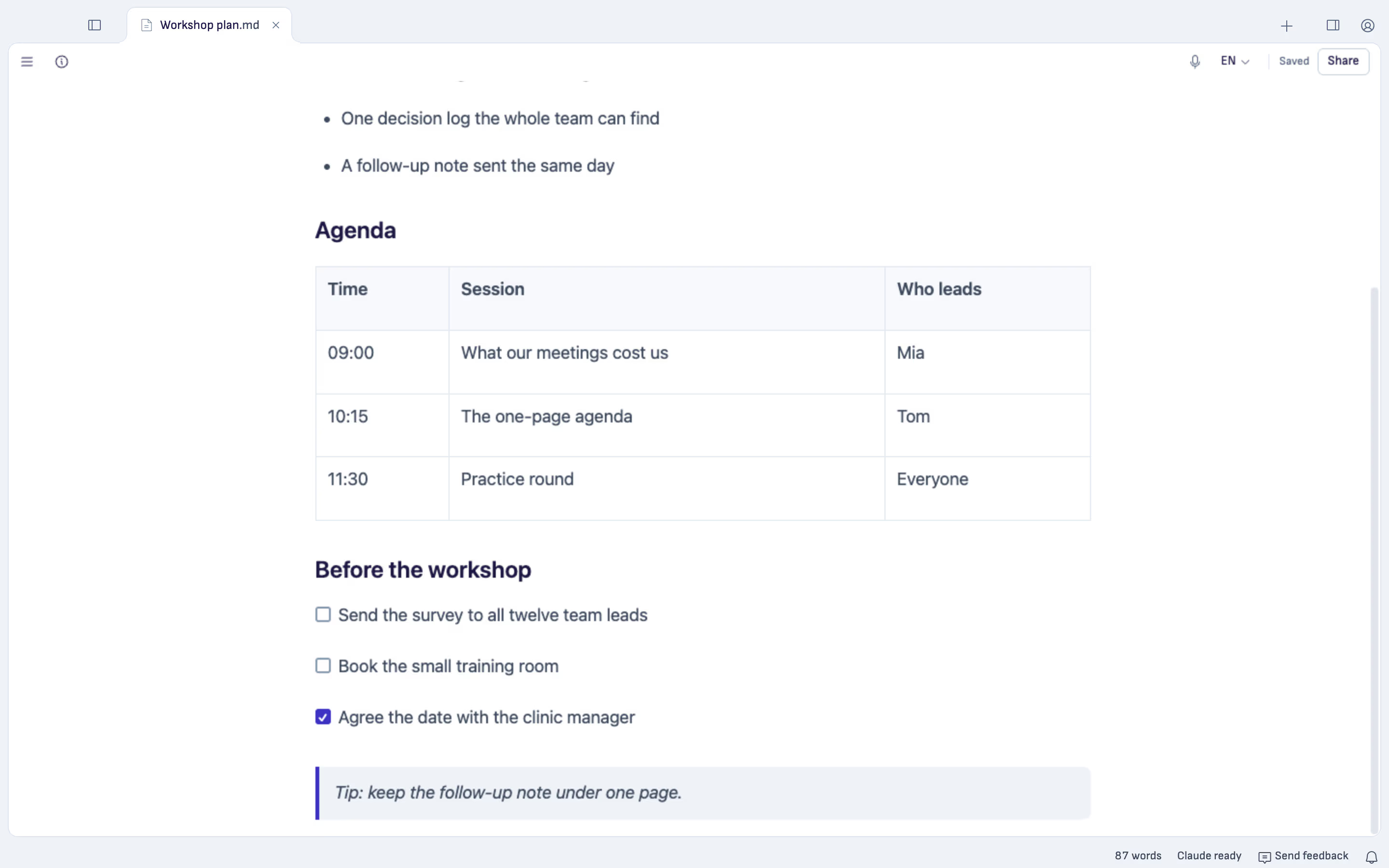
You can edit the page like a Word document. We ticked one box and added a sentence to the tip, and Ritemark showed "Saved". The file on disk was still a clean .md file, with the box ticked and the new sentence in it, so you can send it on or give it back to the AI as it is.
On Windows we have not tested this yet. Ritemark's own guide gives the way for both systems: put the file in a folder of its own, open Ritemark, choose File, then Open Folder, and pick that folder. Then open Documents at the top left and click the file. In a folder, the AI in Ritemark can also read the file when you ask it for something.
To send the document to someone who doesn't use Markdown, choose Share on the document's bar and send a copy as Word or PDF. The .md file stays as it is.
How to open an .md file on Windows
On Windows 11, try Notepad first. Microsoft has been adding formatting to Notepad since 2025, and it "supports Markdown style input and files", so a current Notepad may show your .md file formatted. Where it does, you switch between the formatted view and the plain Markdown text from the View menu or with the switch in the status bar. Microsoft's notes describe this for its test versions of Windows 11, and we have not checked it on a Windows computer.
If Windows asks "How do you want to open this file?", pick the app you want and tick "Always use this app" so it opens the same way next time. To change it later, go to Settings, then Apps, then Default apps, search for .md and choose an app. Notepad shows light formatting. To edit a longer document as a page, and to work on it with the AI, open it in Ritemark instead.
How to open an .md file on a Mac
On a Mac, open an .md file in an app that understands Markdown. In our test on macOS 26.5.1, Quick Look, the Mac's own preview, showed the plain text with every # and star in it, and so did Google Chrome.

So install an app first: Ritemark if you want to read and edit the file as a page, or one of the apps below. Then right-click the file, choose Open With and pick it. We did not test TextEdit.
Other apps that open .md files
We checked these on their makers' own pages on 24 November 2026 but did not test them.
Obsidian
Obsidian is a notes app that keeps notes as Markdown files. Since version 1.14, from 5 October 2026, it opens a single .md file from outside your notes, shows up in Open With, and can be the default app for Markdown files. It needs the latest installer for this. Pick Obsidian if you want the file to sit with the rest of your notes and you link notes to each other by hand.
Visual Studio Code
Visual Studio Code is Microsoft's code editor, and it opens Markdown files without anything extra. To see the file formatted, press Cmd+Shift+V on a Mac or Ctrl+Shift+V on Windows, or Cmd+K and then V (Ctrl+K and then V on Windows) to see the preview beside the text. Pick it if you already write code in it.
Microsoft Word
Microsoft's own list of what is new in October 2026 says Word on the web can convert between .md and Word files. It does not say the same of Word on Windows or Mac, so we would not count on the desktop app to open an .md file as a page.
When to pick Ritemark
Pick Ritemark if the .md file is a document you work on: a plan, a report or a brief that ChatGPT or Claude wrote with you. It opens the file as a page, you edit it like in Word, and it stays a Markdown file that the AI can read and change again. In Ritemark the AI starts from your documents, not from one chat box. When the work is done, Share sends a copy as Word or PDF.
Ritemark is free and open source, for Mac and Windows. The AI in it runs on your own account: any ChatGPT account, Free included, or a paid Claude plan.
Frequently Asked Questions
What is an .md file?
An .md file is a Markdown file: plain text with small marks for formatting, such as # for a heading and two stars around bold words. Any text app can open it. An app that understands Markdown shows it as a formatted page.
Why does my .md file show # and stars?
Because the app you opened it in shows the Markdown marks as text. Open it in an app that understands Markdown, such as Ritemark, or Notepad's formatted view on Windows 11, and you see headings and bold text instead.
Can Notepad open .md files?
Yes. Notepad opens any .md file as text. On Windows 11, Microsoft has been adding a formatted view that shows Markdown as headings, bold text and lists. Where your Notepad has it, you switch it from the View menu or the status bar.
How do I open an .md file on a Mac?
Install an app that understands Markdown, such as Ritemark, then right-click the file, choose Open With and pick the app. In our test on macOS 26.5.1, Quick Look and Google Chrome showed the plain text with its marks.
Can I open an .md file in Word?
Microsoft says Word on the web can convert between .md and Word files since October 2026. To send a Markdown document to someone who uses Word, open it in Ritemark and choose Share, then Word document.
Can I edit an .md file, or only read it?
You can edit it. In Ritemark you edit it as a page, and your changes are saved back into the same .md file. In a plain text app you edit the text and the marks yourself.
ChatGPT gave me an .md file. What do I do with it?
Open it in Ritemark to read it as a page and change what you want, then send it as Word or PDF from Share, or give it back to the AI. To give the AI .md files in a chat, read Can ChatGPT read .md files?.
Tested on 24 November 2026 on a Mac with macOS 26.5.1: Ritemark 2.3.0, Google Chrome 158.0.8127.88 and Quick Look. The test file and the names in it are made up. Checked on the same day on the makers' own pages: Microsoft's notes on Notepad and Word and its guide to default apps, the Visual Studio Code guide to Markdown, and Obsidian's changelog. Windows, Notepad, Word, Visual Studio Code, Obsidian and TextEdit were not tested.
For your first steps in Ritemark, read Getting started with Ritemark. For Ritemark next to Obsidian, read Ritemark vs Obsidian.
Want to read and edit your .md file as a normal page? Download Ritemark for Mac or Windows.
Start writing with Ritemark.
Free and open source. Mac and Windows.