
AI search over local documents lets you query your own files in plain English and get answers grounded in your actual content — not guesses from a language model's training data. You ask a question, the AI retrieves the relevant passages from your own files, and shows you exactly where the answer came from.
The answer is already in your files. You wrote it down six months ago, or last Tuesday, or somewhere between a project kickoff and a late-night research session. The problem isn't that you don't have the information — it's that you can't find it when you need it most.
AI search over local documents changes this entirely. Instead of typing keywords and hoping for a match, you ask a question in plain English: "What did the client say about the deadline?" or "Which projects are over budget?" The AI understands what you mean and surfaces the relevant passages from your own files, cited and contextual.
The Search Problem Knowledge Workers Actually Have
AI search over local files solves a specific problem: finding information you already own but can't locate quickly. Traditional tools like Spotlight, Windows Search, or Ctrl+F match keywords — they find the word "deadline" but not the concept of "things that are running late." AI semantic search understands intent.
McKinsey research puts the scale of this problem in sharp focus. The average knowledge worker spends 1.8 hours every day — nearly 9.3 hours per week — searching for and gathering information. That's almost a quarter of the working week devoted not to doing work, but to finding it.
It gets worse. A 2023 Elastic report found that employees search for information across six or more different tools. Notes in one app, email in another, project files in a third, research in a fourth. Every tool has its own search. None of them talk to each other. None of them understand what you're actually looking for.
 Six-plus tools, zero shared search. The daily reality for most knowledge workers.
The irony is striking: we have remarkably sophisticated tools for searching the entire public internet in milliseconds, yet searching our own private knowledge — the files we wrote ourselves, the notes we took — remains stubbornly primitive.
Why Keyword Search Fails You
Keyword search was designed for a different problem. It works by matching exact strings of text — the characters you typed against the characters in the document. It's fast, deterministic, and completely literal.
That literalness is the limitation. If you search for "Q3 revenue projections" but your document says "third quarter financial forecast," keyword search returns nothing. If you're looking for notes about a difficult client conversation but you labeled the file with the project name, not the word "client," you'll never find it.
This matters more than it sounds. Research from the University of California, Irvine showed that interrupted workers took an average of 23 minutes and 15 seconds to fully regain focus after a significant interruption. Every failed search that sends you digging through folders is an interruption. Every time you give up and just rewrite something from scratch because you can't find the original — that's lost work, compounding.
Semantic search fixes this at the root. Instead of matching characters, it matches meaning.
What Semantic Search Actually Does (Without the Jargon)
The technical name is RAG — Retrieval-Augmented Generation. It sounds intimidating, but what it means for you is straightforward.
When you index your documents, each of your files gets converted into a mathematical representation of its meaning — called an embedding. Two sentences that mean the same thing will have similar embeddings, even if they share no words. So "the project is behind schedule" and "we're running late on delivery" are recognized as semantically close, because your documents are understood by meaning, not just characters.
When you ask a question, your question gets converted into the same kind of representation. The system then finds the passages in your files whose meaning is closest to what you asked. Those passages get handed to an AI model, which synthesizes an answer and shows you exactly which of your files it drew from.
The result: you get a direct answer, grounded in your actual documents, with links back to the exact files it came from.
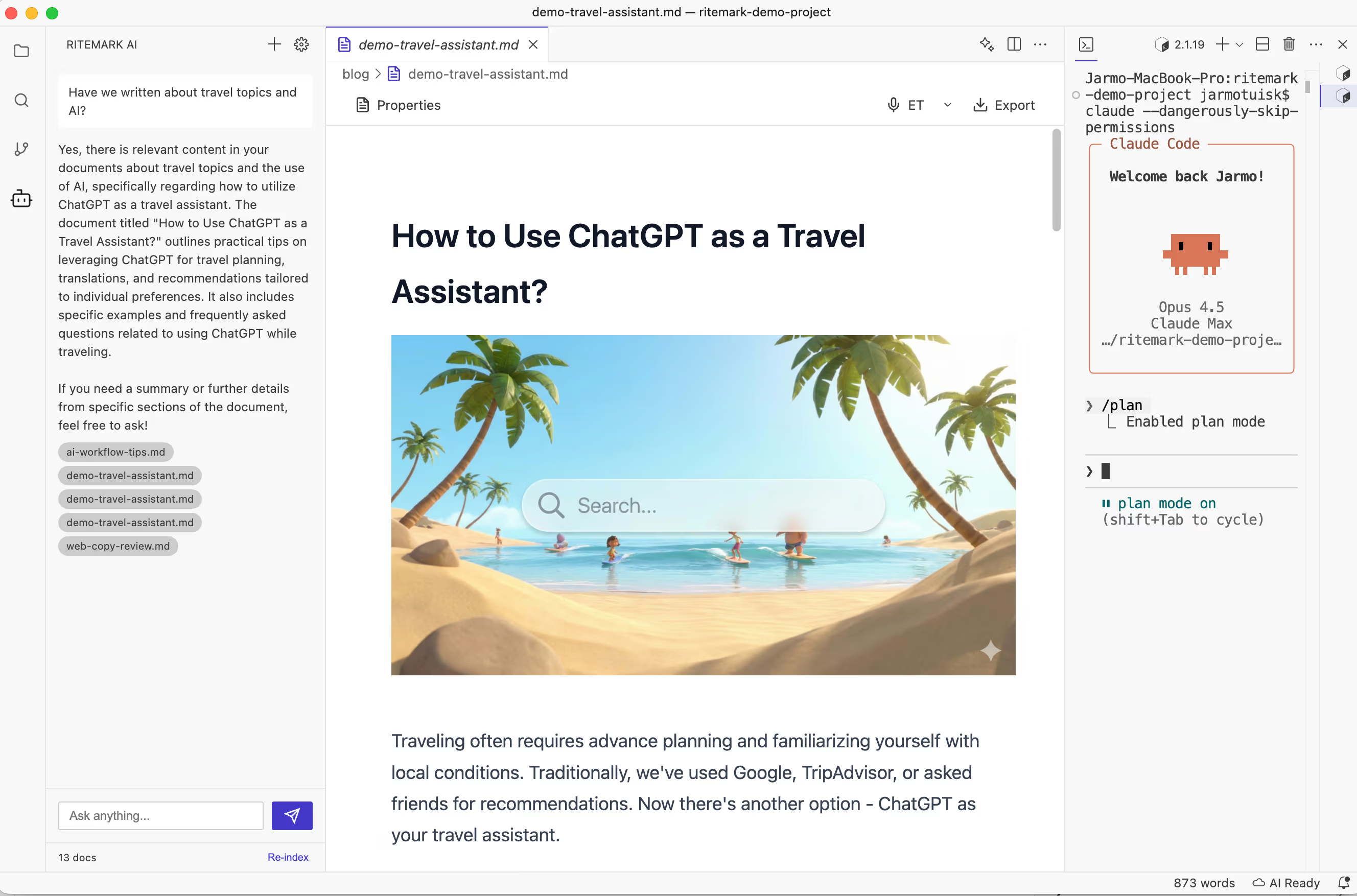 Ask in natural language, get answers sourced from your own files — not invented by the AI.
This distinction matters enormously. General AI (ChatGPT, Claude responding from memory) can hallucinate — confidently stating things that aren't true. AI search over your local documents is fundamentally different: it can only answer from what's actually in your files. If the information isn't there, it says so.
Who Benefits Most
The impact of AI document search is felt most acutely by people who accumulate large personal knowledge bases over time.
Researchers and academics spend years building literature notes, paper summaries, and hypothesis journals. A research assistant that can answer "What have I written about methodology limitations in qualitative studies?" is transformative. Lawyers maintain enormous case files, precedent notes, and client correspondence — the ability to ask "What was our strategy for the Johnson case?" rather than searching through folders of PDFs saves hours.
Writers and journalists keep research archives, interview transcripts, and background notes that grow across years of work. Project managers accumulate meeting notes, decision logs, status updates, and stakeholder feedback across multiple active projects simultaneously.
What all these people share is the same underlying problem: they've invested enormous effort into creating knowledge, but the return on that investment degrades as the volume grows. AI search inverts this relationship — the more you've written, the more valuable the search becomes.
Obsidian's Smart Connections and the Rise of Local AI Search
The Obsidian community built one of the earliest popular implementations of this idea. The Smart Connections plugin for Obsidian created a semantic search layer over your vault, letting you find conceptually related notes even without explicit links between them.
Its adoption was a signal. Knowledge workers actively want their tools to understand their content, not just match their keywords. The plugin became one of the most popular in the Obsidian ecosystem — and its growth coincided with broader awareness of what RAG could do for personal knowledge management.
Other tools followed. Notion AI, Bear's Smart Folders, and various Obsidian plugins all reflect the same shift: semantic understanding of your own content is no longer a research prototype. It's an expected feature.
How Ritemark's Document Search Works
We added document search to Ritemark in v1.1.0 under the name "Ask Your Documents Anything." It was built specifically for markdown workspaces, with privacy as the starting constraint rather than an afterthought — you can read more about why that matters in Local First, AI Second. It was removed in v1.7.2, when the agents in the AI sidebar took over reading the files in your folder.
Open a workspace, click the AI icon in the sidebar, and hit Re-index. Ritemark creates a local vector index of all your markdown files using Orama — a zero-dependency vector database that runs entirely on your Mac. The index lives in .ritemark/rag-index.json on your machine.
 One click. Your entire workspace becomes queryable.
Once indexed, you can ask anything: "What did I note about the API rate limits?" or "Summarize my research on user onboarding patterns." Ritemark retrieves the relevant passages, synthesizes an answer, and shows you exactly which files it drew from.
Your files and the index stay on your machine. The outbound calls are to generate embeddings during indexing and to run the AI chat response, so text from your files does go to the AI provider. You can read the full story in Ask Your Documents Anything, where we described the technical approach in detail.
Pro tip: The index persists between sessions. You only need to re-index after adding new files or making significant changes to existing ones. Most users re-index once a week.
The Next Frontier: AI That Surfaces Context Proactively
The current model — you ask, AI answers — is already a significant step forward. But it's still reactive. You have to know to ask.
The more interesting future is AI that reads what you're writing and proactively surfaces relevant context from your archive. You're drafting a proposal for a client, and your editor notices you've written about this client's concerns before. It quietly surfaces those notes alongside your draft. You're researching a topic, and your tool notices thematic connections to work you did eighteen months ago that you'd forgotten existed.
This is where tools like Ritemark are heading. The document search feature in v1.1.0 was Phase 1. The planned phases for PDF, Word and PowerPoint support and MCP access never shipped: document search was removed in v1.7.2, and the agents in the AI sidebar now read the files in your folder directly. If you use Claude Code for development, the Claude Code knowledge management guide shows how this fits into a real workflow. The longer arc is toward an editor that functions as an ambient research partner — one that knows everything you've ever written and offers it when it's useful.
The knowledge is already there. The work is making it accessible.
Try It Now
Document search was removed in Ritemark 1.7.2. Today you ask the agent in the AI sidebar, and it reads the files in your folder to answer. The app is free; the agent needs a paid Claude or ChatGPT plan or your own API keys.
Download Ritemark — free for macOS (Apple Silicon).
FAQ
What is AI search over local documents? It lets you query your own files in plain English and get answers grounded in your actual content — not guesses from a model's training data.
How is AI semantic search different from Spotlight or Ctrl+F? Keyword tools match exact characters. AI semantic search matches meaning, so "financial forecast" and "revenue projections" return the same results.
What is RAG and how does it relate to document search? RAG (Retrieval-Augmented Generation) converts your files into meaning-based embeddings, retrieves the relevant passages when you ask a question, then generates an answer from those passages.
Does AI document search send my files to the cloud? Partly. In Ritemark's document search (removed in 1.7.2), your files stayed on your machine, but text chunks from them went to an embeddings API during indexing. Today the agent in the AI sidebar sends whatever it reads to the AI provider you chose, under your account and its terms.
How much time can AI document search save? McKinsey puts the current cost at 9.3 hours per week spent searching. Semantic search cuts this most for "I know I wrote this somewhere" queries.
Who benefits most from AI search over local files? Anyone with a large, growing archive: researchers, lawyers, writers, project managers. The more you've written, the more valuable the search becomes.
What is a PKMS and why does it benefit from AI search? A Personal Knowledge Management System (Obsidian, Logseq, Notion) grows to thousands of files over time. AI semantic search makes that entire archive queryable by meaning.
Can AI search over local files work without internet? Only partly. The search index lives on your device, but you need a connection to re-index and to get the AI's answer.
How does Ritemark's document search compare to Obsidian's Smart Connections plugin? Both use semantic embeddings over markdown. Ritemark is a native macOS editor, so you search and draft in the same app without switching tools.
What's coming next for AI document search in Ritemark? Document search was removed in Ritemark 1.7.2. The agents in the AI sidebar (Claude Code, Codex and OpenCode) now read the files in your folder directly.