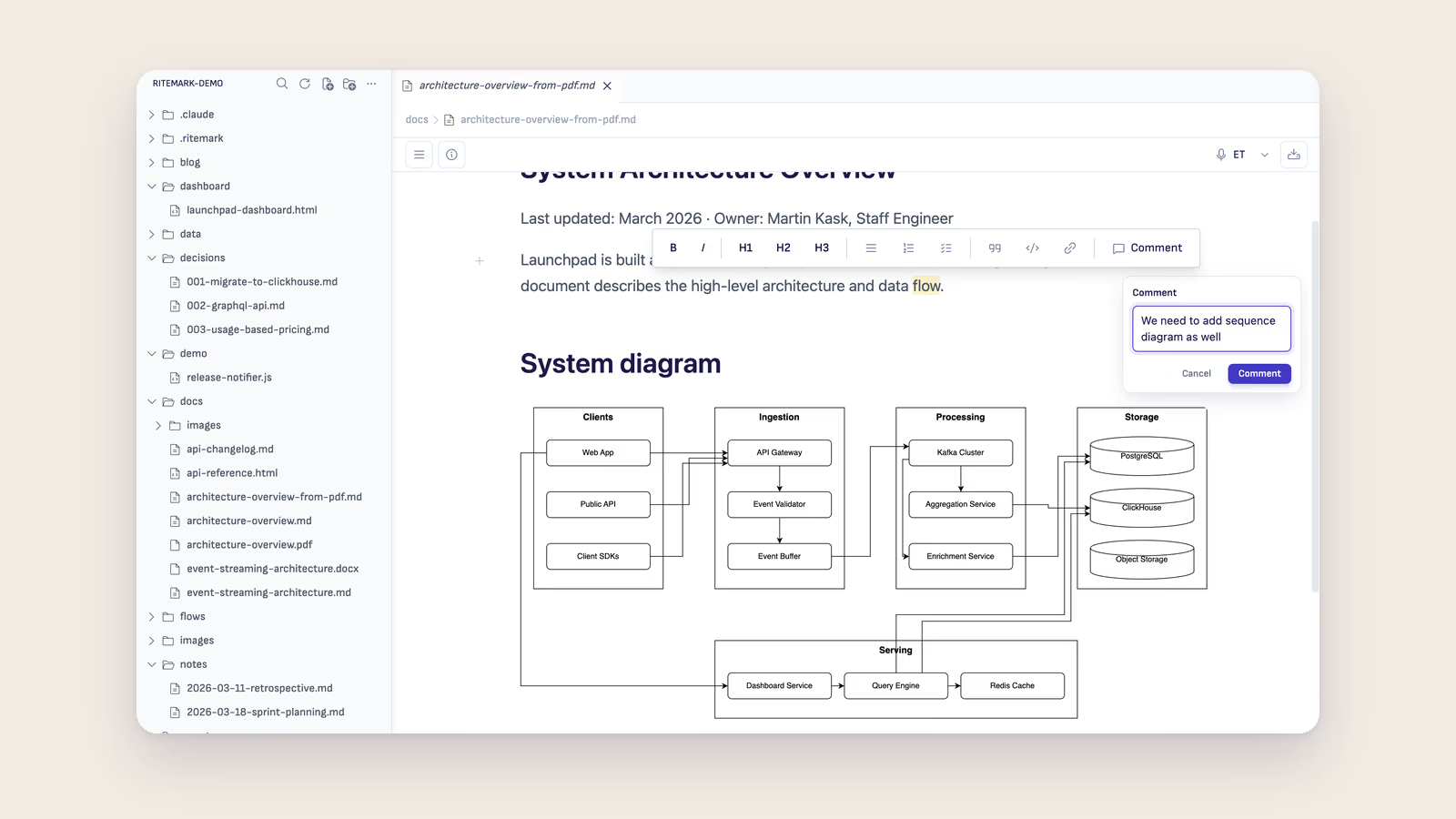
The best AI workflow for technical documentation depends on the task: drafting from code comments, reviewing existing docs for gaps, translating to another language, or generating usage examples. In Ritemark, an AI agent such as Claude Code, Codex or OpenCode works in the AI sidebar and edits your markdown documentation files directly, handling tasks from grammar fixes to full section generation.
This approach works for API documentation, README files, user guides, internal wikis, and any documentation written in markdown.
Why AI Works Well for Technical Docs
Technical documentation follows predictable patterns. API endpoints have descriptions, parameters, response formats, and examples. README files have installation steps, usage instructions, and contribution guidelines. User guides have step-by-step procedures with screenshots and tips.
AI excels at these structured formats because the patterns are consistent and well-represented in training data. An AI agent can generate boilerplate sections, ensure consistent formatting across hundreds of pages, and catch inconsistencies that human reviewers miss after hours of reading.
Where AI helps most is the tedious work: making sure every API endpoint has a complete example, adding error handling notes to every procedure, translating documentation to other languages while preserving code blocks and formatting, and maintaining consistent terminology across a large documentation set.
Documentation Workflows in Ritemark
Workflow 1: Draft from Code Comments
If your codebase has comments and docstrings, AI can generate documentation from them. Open your project folder in Ritemark and tell Claude Code:
Read the source files in /src and generate API documentation in /docs.
Include function signatures, parameter descriptions, return values, and usage examples.
Claude reads your code, extracts the documented functions, and creates properly formatted markdown documentation.
Workflow 2: Review and Improve Existing Docs
Point AI at your existing documentation for quality review:
Review all markdown files in /docs for:
- Missing sections (every API endpoint needs an example)
- Inconsistent formatting
- Outdated version numbers
- Broken internal links
Report issues and fix them.
This catches problems that manual review often misses, especially in large documentation sets.
Workflow 3: Translate Documentation
For multilingual documentation, AI translation preserves markdown structure:
Translate getting-started.md to Estonian. Save as getting-started-et.md.
Keep all code blocks, links, and markdown formatting unchanged.
The AI understands that code blocks should not be translated and that link URLs should remain intact.
Workflow 4: Generate Examples
The most time-consuming part of API documentation is writing realistic examples. AI can generate them:
For each API endpoint documented in api-reference.md, add a curl example
and a JavaScript fetch example showing a realistic use case.
Workflow Comparison
| Workflow | Input | Output | Best For |
|---|---|---|---|
| Draft from Code Comments | Source code + docstrings | Generated API docs in /docs |
Bootstrapping docs for an undocumented codebase |
| Review and Improve Existing Docs | Existing markdown files | List of gaps + fixes | Auditing a large docs set for missing sections or broken links |
| Translate Documentation | One-language markdown file | Translated file, formatting preserved | Multilingual documentation sets |
| Generate Examples | API reference markdown | curl + JavaScript examples per endpoint | Filling in the most time-consuming part of API docs |
Best Practices for AI-Assisted Documentation
Always review AI output for technical accuracy. AI generates plausible-looking documentation that may contain subtle errors. API parameter names, version numbers, and system requirements must be verified against the actual product.
Provide context about your product. Before asking AI to write documentation, tell it about your project: what it does, who uses it, what technology stack it uses. The more context the AI has, the more accurate and relevant the documentation will be.
Use version control. Commit your documentation to git before running AI edits. This lets you review changes with git diff and revert if the AI makes unwanted modifications.
Maintain a style guide. Tell the AI your documentation conventions: whether to use "you" or "the user," whether to capitalize feature names, whether to use American or British English. Consistency across AI-generated sections matters.
Frequently Asked Questions
Can AI write accurate API documentation?
AI can generate well-structured API documentation from code comments and existing docs, but you must verify technical details. Function signatures, parameter types, and edge cases need human review. AI handles the formatting and prose; you verify the facts.
How does AI handle code blocks in documentation?
AI agents like Claude Code understand markdown code blocks and preserve them during translation, restructuring, and editing. Code syntax, indentation, and language annotations are maintained correctly.
Is AI-generated documentation good enough to publish?
AI-generated documentation is a strong first draft that typically needs 15-20 minutes of human review per article. The time savings compared to writing from scratch are significant, especially for repetitive content like API endpoint descriptions.
Can AI keep documentation in sync with code changes?
You can ask AI to compare your documentation against current code and flag discrepancies. This is not automatic, but running a review after each release takes minutes and catches outdated information.
What about diagrams and screenshots in documentation?
AI generates text-based documentation. Diagrams (Mermaid, PlantUML) can be generated as text. Screenshots must still be taken manually, though AI can suggest where screenshots should be placed and what they should show.
Does Notion AI or GitHub Copilot handle documentation the same way?
Not quite. Notion AI drafts and summarizes content inside Notion's cloud workspace but cannot read your actual source code files. GitHub Copilot excels at inline code suggestions but is not built for generating whole documentation files from a folder of markdown. An agent like Claude Code in Ritemark's AI sidebar reads and writes documentation files directly across a project.
Which AI workflow should I use first for a new project?
Start with "Draft from Code Comments" if your codebase already has docstrings — it produces a usable first draft fastest. If you're documenting an existing product with outdated docs, start with "Review and Improve Existing Docs" to find the gaps before writing anything new.
Start writing with Ritemark.
Free and open source.