The repetition problem
Writers who use AI assistants develop routines. You open a file, copy specific sections, paste them into a prompt, wait for the result, clean up the output, and save it back. The steps are always the same. The content changes, but the process does not.
Doing this once takes a few minutes. Doing it twenty times across a documentation set takes an afternoon. And because each step is manual, small mistakes creep in. You forget to include the right context. You paste into the wrong file. You skip a step because you are tired of repeating the same sequence for the fifteenth time.
Flows turn routines into reusable workflows
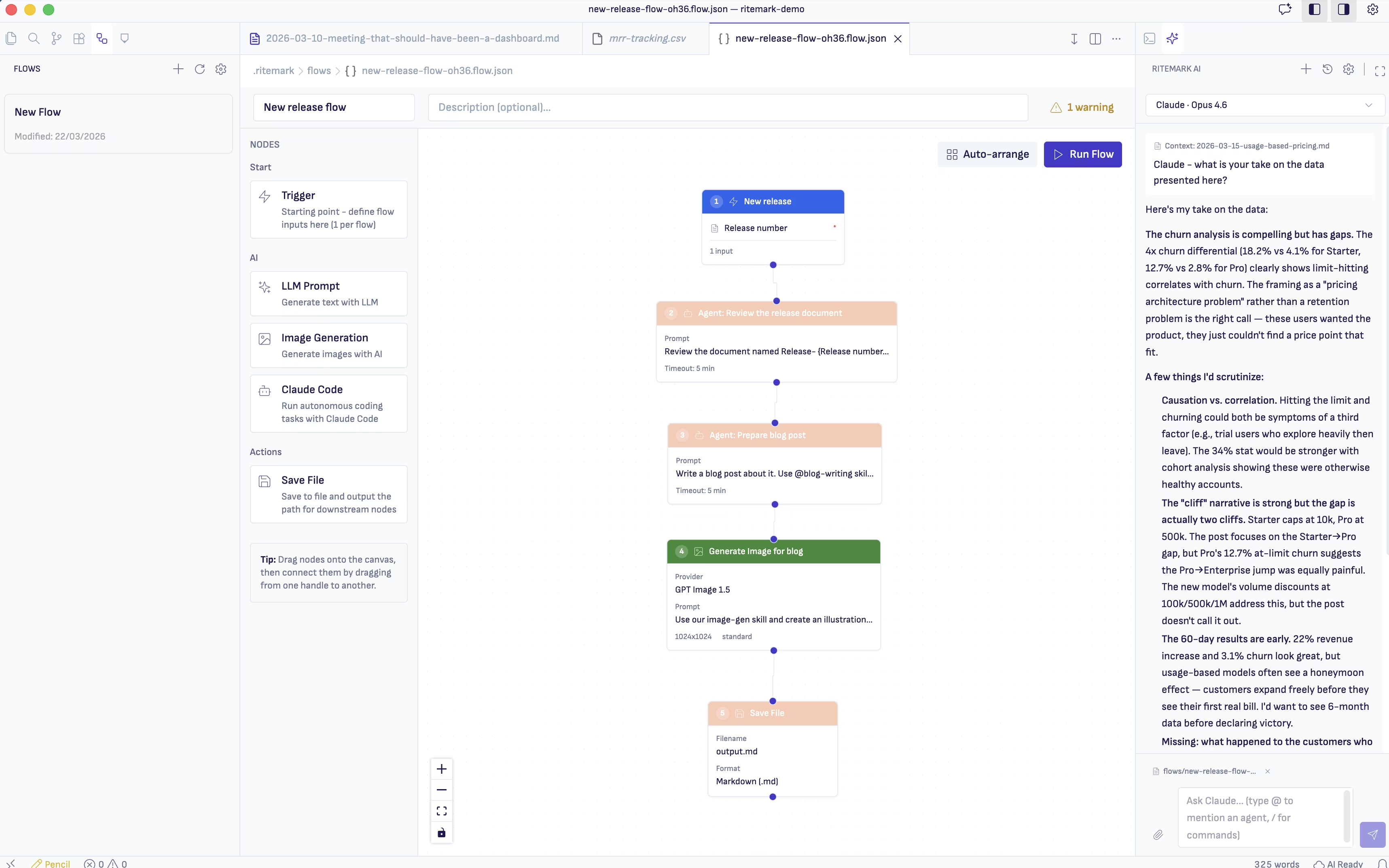
Ritemark Flows is a visual automation builder that lets you define a sequence of operations and run them with a single click. Each flow is a chain of connected nodes. One node reads a file. The next sends that content to an LLM with a specific prompt. The next takes the LLM output and writes it to a destination file. You build the chain once, then run it whenever you need it.
The editor is visual. You drag nodes onto a canvas, connect them with lines, and configure each node's settings in a side panel. There is no scripting language to learn. If you can describe your workflow as "first do this, then do that," you can build it as a flow.
What a typical flow looks like
Imagine you maintain a product changelog and need to turn each entry into a customer-facing release note. Without Flows, you would read the changelog, mentally filter the technical details, write a friendlier version, and save it somewhere. With Flows, you build this once.
The first node reads the changelog file from your project. The second node sends the content to Claude with instructions: "Rewrite these developer notes as customer-friendly release notes. Keep the tone warm but factual. Group by feature area." The third node receives the LLM response and saves it as a new Markdown file in your releases folder.
You run the flow whenever you push a new changelog entry. Same quality, same format, every time.
Building your first flow
Open the Flows panel in Ritemark and create a new flow. The canvas starts empty. Drag a File Read node from the sidebar and point it at your source file. Drag an LLM Prompt node and connect the output of the file reader to its input. Write your prompt in the node's configuration, using a placeholder for the incoming content. Finally, add a File Write node and connect the LLM output to it.
Click run. The flow executes each step in sequence, passing data from one node to the next. The result appears in your project folder, ready to review or publish.
If the output is not quite right, you adjust the prompt in the LLM node and run again. The file reading and writing logic stays the same. You only iterate on the part that matters.
Why this changes daily work
The real value of Flows is not speed, though that matters too. It is consistency. When a workflow runs the same way every time, the output quality stabilizes. You stop worrying about whether you remembered all the steps. You stop second-guessing whether this batch got the same treatment as the last one.
For writers managing documentation, marketing content, or technical publications across multiple files, Flows remove the mechanical parts of the job. You still make the creative decisions, choosing the right prompt, reviewing the output, deciding what ships. But the plumbing between those decisions runs itself.
Everything executes locally on your machine. Your files stay in your project folder, and the LLM calls go directly to your chosen provider. Ritemark does not store your content or your workflows on any external server.
Get started with Flows and turn your repetitive writing tasks into one-click operations.